OpenNode Review: Fees, Features & Setup Guide

Updated: November 2025

Quick verdict

positive icon Best for: Merchants who want compliant, turnkey Bitcoin acceptance without running their own nodes.

neutral icon Consider if: You need to settle to fiat, Lightning, or on-chain from the same dashboard and API.

negative icon Not ideal when: You must keep keys in-house or require zero processor fees.
Getting started

Set up your OpenNode payment stack

1. Create and verify your account

1. Create and verify your account

Setup time: ~10 minCost: FreeRisk: Low

Initial sync: Depends on KYC review queue

  1. Register on the dev or production dashboard and pick individual or business onboarding.
  2. Upload the requested ID, selfie, and proof-of-address documents so compliance can unlock payouts.
  3. Enable two-factor authentication before inviting teammates or generating live API keys.

Gotcha: Higher processing limits stay capped until KYB completes, so have incorporation and ownership docs ready.

2. Configure settlement & checkout

2. Configure settlement & checkout

Setup time: ~10 minCost: FreeRisk: Low
  1. Navigate to Settings > Payments to decide if you want to keep Bitcoin or auto-convert to local currency (USD, EUR, GBP).
  2. Upload your store logo and cover image so the payment window matches your brand.
  3. Create a Payment Button or Pos Link if you need a simple way to collect money without a full website.

Gotcha: Auto-conversion protects you from volatility but usually incurs a slightly higher fee (e.g., 1%) than keeping Bitcoin.

3. Connect your e-commerce store

3. Connect your e-commerce store

Setup time: ~15 minCost: FreeRisk: Low
  1. Click on Integrations to find the official plugin for your platform (WooCommerce, Shopify, Magento, etc.).
  2. Generate an API Key in the dashboard and paste it into the plugin settings on your own website.
  3. Run a test order on your shop to confirm the status updates from Pending to Paid automatically.

Gotcha: Ensure your website uses HTTPS (SSL); the secure connection is required for OpenNode to mark orders as paid.

4. Fund the fiat wallet and send payouts

4. Fund the fiat wallet and send payouts

Setup time: ~20 minCost: Wire feeRisk: Medium
  1. Contact support or use the live chat to wire fiat into your local currency wallet for payouts.
  2. POST to /v2/withdrawals with auto_confirm set to false to preview the BTC quote before committing.
  3. Confirm Lightning or on-chain payouts and monitor their status from the dashboard or webhook logs.

Gotcha: Preview quotes expire quickly, so confirm before the expiry timestamp if you want the same FX rate.

Quick answers

Does the developer environment use real bitcoin?

No. Dev API keys hit OpenNode's testnet stack so you can experiment with fake sats before you flip to production.

Do I need to run a Lightning node to use OpenNode?

OpenNode runs the channels for you, so you only manage API keys, webhooks, and payout destinations.

Fees: what you pay and when

Costs & speed: what you pay and when

Accept payments

1% processing fee

What happens:
OpenNode charges a flat 1% fee on all incoming payments (both Lightning and on-chain). There are no setup, monthly, or minimum fees.

Optimization:
Since the fee is percentage-based, you pay less when you process less volume.

Learn more

https://help.opennode.com/en/articles/3176293-pricing-and-fees

Withdraw Bitcoin

Lightning: Free
On-chain (Instant): 1%
On-chain (Scheduled): Free

What happens:
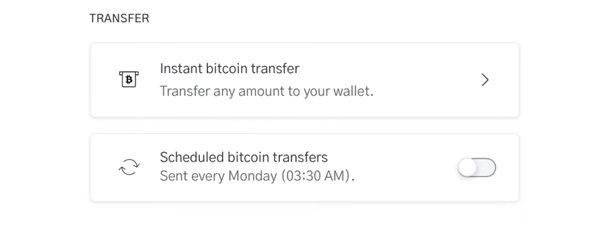
Moving bitcoin to your own wallet is free if you use Lightning or scheduled weekly transfers. Instant on-chain withdrawals incur a 1% surcharge plus mining fees.

Optimization:
Enable scheduled weekly transfers to sweep your balance on-chain for free, or use Lightning for instant, free withdrawals.

Learn more

https://help.opennode.com/en/articles/3133789-bitcoin-transfers

Withdraw to Bank

Varies by bank partner

What happens:
You can schedule daily transfers or initiate one-time wires to your bank account. OpenNode does not charge a conversion fee, but bank transfer fees apply.

Optimization:
Check the specific bank transfer fees in your dashboard; scheduled daily transfers may offer better rates or convenience.

Learn more

https://help.opennode.com/en/articles/3193957-usd-bank-transfers

Conversion & Settlement

No conversion fee

What happens:
OpenNode allows you to convert between Bitcoin and local currency (like USD, EUR, GBP) instantly or at the time of transaction without any added spread or conversion fee.

Optimization:
Use Split Settlement to automatically hedge a portion of your revenue while keeping the rest in Bitcoin.

Learn more

https://help.opennode.com/en/collections/1858250-currency-conversion-and-funds-transfers

Quick answers

Are Lightning withdrawals free on OpenNode?

Yes. Instant Lightning withdrawals carry no extra fee, while on-demand on-chain withdrawals take the standard 1% plus the mining fee you select.

Do scheduled transfers cost anything?

Weekly scheduled Bitcoin transfers are free, so you can let OpenNode sweep balances without paying the instant withdrawal fee.

Key terms
Charge
An API object that contains both a BOLT11 invoice and an on-chain address so your customer can choose how to pay.
Hosted checkout
OpenNode's ready-made payment page at checkout.opennode.com/{id} that renders totals, QR codes, and status updates for you.
LNURL-Withdrawal
A Lightning withdrawal flow where OpenNode issues a QR-encoded link so wallets can pull a fixed or ranged amount of sats.
Custody, compliance & risk

Custody, compliance & risk

Custody

OpenNode holds funds until you withdraw or auto-settle to your wallet or bank, so their ledger is the source of truth until you sweep.

  • Funds stay custodial until withdrawn
  • Auto-settlement to BTC or fiat
  • Set withdrawal limits per role

Data Privacy

Hosted checkout does not ask for personal payer data unless you collect it, which reduces the blast radius of a breach.

  • Payment pages need only invoice info
  • No card numbers stored
  • Webhook payloads limited to order data

Jurisdiction & Availability

OpenNode serves global merchants but unlocks features per jurisdiction once the right regulatory checks are complete.

  • Dev stack available worldwide
  • Production access depends on KYC/KYB
  • Fiat rails limited to supported regions

Compliance

Individual accounts submit ID and a selfie, while businesses provide ownership, address, and formation records before payouts go live.

  • Supports individual and business flows
  • Control person data required above 25%
  • Support reviews leadership attestations

Operational Risk

You still manage API keys, callback URLs, and team permissions, so secure your credentials like production secrets.

  • Rotate API keys after testing
  • Whitelist payout IPs where possible
  • Monitor status.opennode.com for incidents

Quick answers

Can OpenNode see my customers' data?

They only see the metadata you pass into charges, so keep invoice fields minimal if privacy matters.

What happens if I lose dashboard access?

Support can re-verify your identity and restore access once you provide the same KYC/KYB data used during onboarding.

Payment methods & limits

Payment & payout rails

Lightning Network

Available
Speed Instant
Withdraw Immediate

Best for: Instant microtransactions and high-volume payments under 5 BTC

View limits & details
Min per transaction1 satoshi
Max per transaction500,000,000 sats (5 BTC)
Max per dayUnlimited
Max per weekUnlimited
Withdrawal eligibilityImmediate

On-chain Bitcoin

Available
Speed ~10-60 min
Withdraw 1 block conf

Best for: Large settlements exceeding Lightning channel capacity

View limits & details
Min per transactionVariable (dust limit)
Max per transactionUnlimited
Max per dayUnlimited
Max per weekUnlimited
Withdrawal eligibilityAfter 1 confirmation

Fiat-funded Payouts

Available
Speed Instant conversion
Withdraw Daily/Weekly

Best for: Merchants who need to pay global contractors in BTC without holding exposure

View limits & details
Min per transactionVaries by region
Max per transactionKYB tier dependent
Max per dayUnlimited
Max per weekUnlimited
Withdrawal eligibilityImmediate conversion
Integrations

Integrations

Drop OpenNode into your stack with plugins for stores, webhooks for automation, and APIs for payouts.

Ecommerce plugins

Official

Install official plugins so customers see OpenNode checkout after they confirm the cart, without exposing API keys client-side.

  1. Install the plugin from your platform's marketplace.
  2. Paste the API key generated in the OpenNode dashboard.
  3. Set the success_url so orders mark paid once OpenNode posts the callback.
See compatible apps
ShopifyWooCommerceBigCommerce

Privacy: Order data stays with your store; OpenNode only receives invoice metadata.

API payouts

Official

Use /v2/withdrawals to send on-chain or Lightning payouts from your fiat or BTC balance.

  1. Wire fiat or deposit BTC into the wallet you want to draw down.
  2. Call /v2/withdrawals with auto_confirm false to receive a quote.
  3. Confirm the quote via the chain or Lightning endpoint before expiry.
See compatible apps
REST APIServer-to-server webhooks

Privacy: Only the payout address or invoice plus the amount leaves your environment.

Webhooks & callbacks

Official

Subscribe to charge, underpayment, refund, and withdrawal events so your ERP, CRM, or fulfillment stack updates in real time.

  1. Provide a callback_url on every charge you create.
  2. Subscribe to withdrawals webhooks so you see Lightning status changes.
  3. Replay webhook payloads in staging to test refund logic before production.
See compatible apps
ZapierCustom HTTPS endpoints

Privacy: Webhooks include only the metadata you send, so do not log unnecessary customer data.

OpenNode merchant stack coverage

OpenNode merchant stack coverage

Hosted checkout

Works

Lightning + on-chain in one link Optional fiat toggle

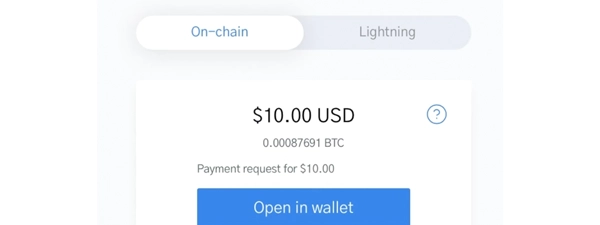
OpenNode renders Lightning and on-chain payment options in a single checkout page, which keeps your app simple while giving customers real-time totals.

Show steps

Gotcha: If you exceed the Lightning amount cap, the page will fall back to on-chain only.

Fiat-funded Bitcoin payouts

Works

Wire USD/EUR/GBP Lightning or on-chain

You can wire fiat into OpenNode and have them convert each payout into sats on demand, so your treasury team never has to hold bitcoin.

Show steps

Gotcha: Quotes expire quickly during volatile markets, so confirm before the expiry timestamp.

LNURL withdrawals

Works

QR-triggered payouts Fixed or ranged amounts

LNURL-Withdrawal lets you hand contractors or users a QR code they can scan to pull sats instantly, anchored by OpenNode's liquidity.

Show steps

Gotcha: If the wallet does not support LNURL, provide a standard Lightning invoice fallback.

Move your OpenNode wallet or funds

Move your OpenNode wallet or funds

Developer sandbox → production

Time: ~30 minCost: FreeRisk: Medium

Choose: Use this when your testnet flow is stable and you are ready for mainnet.

Show steps
  1. Swap your dev API key for a production key inside the dashboard.
  2. Update webhook URLs so production callbacks reach your live endpoints.
  3. Run a $0.01 equivalent test payment to confirm charge and fulfillment flows.

Tips: Keep sandbox keys around for regression testing.

Gotcha: Production Lightning invoices enforce the 500000000 sat cap even if your sandbox tests exceeded it.

BTC settlement → split or fiat

Time: ~10 minCost: FreeRisk: Low

Choose: Use this when you want to auto-convert a percentage of every payment.

Show steps
  1. Open Settings → Payments and choose split settlement.
  2. Set the BTC percentage you want to keep versus the fiat share you want to convert.
  3. Save and run a small charge to confirm the split posts to both wallets.

Tips: Document the new accounting flow so finance knows where to look for each portion.

Gotcha: Changes only affect new charges; historical payments keep their original settlement path.

Rotate API keys safely

Time: ~5 minCost: FreeRisk: Low

Choose: Use this when teammates leave or you are moving secrets to a new vault.

Show steps
  1. Generate a new API key in the dashboard without deleting the old one yet.
  2. Deploy the new key to your serverless secrets or vault.
  3. Delete the previous key once traffic confirms the swap.

Tips: Schedule rotations quarterly so stale keys do not linger.

Gotcha: Deleting a key immediately will break plugins tied to it, so update integrations first.

Release & Trust

Release & Trust

Security & compliance

Security & Protection page outlines fraud monitoring, multisig storage, and IP whitelisting options.

Security posture
Privacy policy

OpenNode publishes a privacy policy covering how onboarding and transaction data are stored and processed.

Privacy policy
Terms & conditions

Terms & conditions detail service eligibility, settlement rules, and liability limits.

Terms & conditions
Profile

Profile

Founder(s)
Joao Almeida & Afnan Rahman
Company description

OpenNode is a Bitcoin-first payment processor that empowers businesses to accept and send Bitcoin—either on-chain or via Lightning—using simple plugins, hosted checkouts, or its developer-friendly API...

OpenNode is a Bitcoin-first payment processor that empowers businesses to accept and send Bitcoin—either on-chain or via Lightning—using simple plugins, hosted checkouts, or its developer-friendly API. Organisations that want a turnkey, compliant solution—especially mid-sized to large enterprises—can onboard easily with KYC and achieve global scale without building complex node infrastructure.

Founded in
2018
Website

FAQs

How does OpenNode's hosted checkout work?

When you create a charge, OpenNode returns a checkout URL that bundles the Lightning invoice and on-chain address so customers can choose their rail. That means you can simply redirect to checkout.opennode.com/{id} and append ln or hf query switches to shape the experience.

What fees does OpenNode charge for processing and withdrawals?

OpenNode charges around 1% for processing plus on-demand on-chain withdrawals, while scheduled weekly transfers stay free and Lightning withdrawals are free. You can choose instant payouts when speed matters or lean on scheduled moves if you want to avoid the extra fee.

How does OpenNode handle underpaid invoices?

You can set an underpayment tolerance so slightly short on-chain payments move forward automatically, and anything below the threshold is flagged as underpaid. Buyers can send the remaining sats or request a refund that returns their funds minus the 200 sat network fee, so you stay in control of the customer experience.

Can OpenNode pay Lightning invoices from my fiat balance?

Yes. Wire fiat into your OpenNode local currency wallet and initiate Lightning or on-chain payouts directly from that balance. The platform quotes the BTC amount and handles conversion so you can fund global payouts without ever holding bitcoin on your books.

What verification does OpenNode require?

Individual accounts submit government ID plus a fresh selfie, while businesses provide formation docs, ownership records, and proof of address so OpenNode can meet KYB obligations. That onboarding is what unlocks higher limits, fiat rails, and access to payout APIs.

×

Rate this service

Alternatives to OpenNode