Sparrow Review: Fees, Features & Setup Guide
Quick verdict
 Best for: Desktop users who want full control over their UTXOs, connection to their own node, and hardware wallet integrations.
 Consider if: You want to connect easily to your own node.
 Not ideal when: You need a mobile wallet or prefer a simplified interface without technical details.
Set up your Sparrow wallet
Set up your Sparrow wallet
1. Install and verify
- Download Sparrow for your OS (Windows, Mac, Linux) and verify the PGP signature.
- Install the application and open the Welcome wizard.
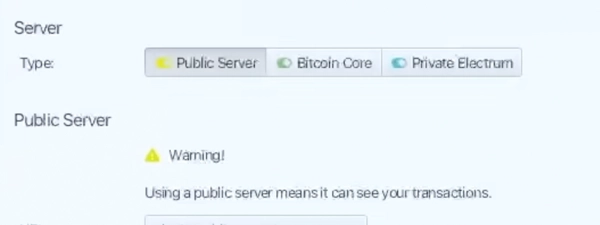
- Choose your server connection: Public server (easiest) or Private Electrum/Core (private).
Gotcha: Public servers see your transaction history. Connect to your own node for full privacy.
2. Create your wallet
- Select 'New Wallet' and choose a meaningful name.
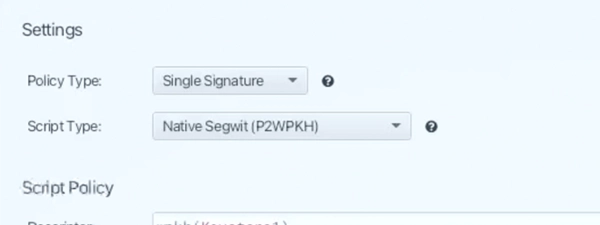
- Pick your policy (Single Signature or Multi Signature) and script type (Native Segwit recommended).
- Select 'New or Imported Software Wallet' for a hot wallet, or 'Connected Hardware Wallet' for cold storage.
Gotcha: Write down your seed words on paper. Never save them digitally or take a photo.
3. Receive and control
- Click 'Get Next Address' in the Receive tab to generate a clean address.
- Send a small test amount to verify everything works.
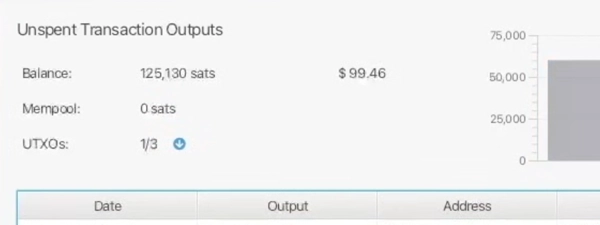
- Use the UTXOs tab to see and label your new coins once they arrive.
Gotcha: Always verify the address on your hardware device screen if using one.
Quick answers
Do I need a hardware wallet to use Sparrow?
No. You can create a 'hot' software wallet secured by a password on your computer. However, for large amounts, pairing Sparrow with a hardware wallet keeps keys offline and much safer.
What happens if my computer crashes?
Your funds are on the blockchain, not in the software. As long as you have your 12 or 24-word seed phrase written down, you can restore your wallet on any other computer.
Can I connect to my Umbrel/Start9 node?
Yes. Sparrow connects easily to private nodes via local network or Tor. This gives you the strongest privacy model possible.
Key features
Who holds your keys & what privacy you get
Coin control
- Visualize UTXOs: See every individual coin chunk, freeze the ones you don't want to spend, and prioritize others.
- Mandatory labeling: Sparrow encourages labeling every address so you know exactly where funds came from.
- Privacy barriers: Prevent accidentally merging KYC coins with non-KYC coins by selecting inputs manually.
Built-in Tor
- One-click privacy: Toggle the built-in Tor proxy to mask your IP address immediately.
- No extra setup: No need to install Tor browser or command line tools separately.
- Onion support: Connect to .onion servers for maximum privacy.
Airgapped signing
- No direct connection: Pass transactions via QR code or SD card so your hardware wallet never touches the computer.
- Watch-only mode: Sparrow builds the transaction; your offline device signs it.
- Broad support: Works natively with Coldcard, Jade, Passport, and Keystone via QR standards.
Flexible security policies
- Single Signature: Standard wallet type; one seed controls everything.
- Multi Signature: Combine keys (e.g., Coldcard + Ledger + Paper) to require M-of-N signatures.
- Gap limits: Customizable gap limits for scanning large or complex wallet histories.
If this happens, can I still move my Bitcoin?
If this happens, can I still move my Bitcoin?
Lose computer
WorksSparrow is just an interface. Your bitcoin lives on the blockchain, secured by your private keys. That means the software or computer can be destroyed without losing funds, as long as you have your backup.
Show steps
- Install Sparrow on a new computer.
- Select 'Import Wallet' and choose your keystore type (Mnemonic or Hardware).
- Enter your 12/24 words or connect your hardware device to regain access.
Gotcha: You must use the same derivation path and script type (e.g., Native Segwit) to see your history.
Lose seed words
Works, with caveatIf you lose your seed phrase but still have the working wallet file and password, you can move funds immediately. If you lose both the seed and the wallet access, the bitcoin is gone forever.
Show steps
- Open Sparrow and use your password to unlock the wallet.
- Immediately create a new wallet with a new seed phrase.
- Transfer all funds from the compromised wallet to the new one.
Gotcha: There is no 'forgot password' or customer support reset. You are the bank.
Inheritance: choose your path
Inheritance: choose your path
1. DIY single-sig
You onlyWhen you control a single seed plus passphrase, heirs need both pieces and clear instructions to restore the wallet. This works when you trust one person to find everything and execute carefully.
- Written seed phrase location
- Passphrase location (stored separately)
- Sparrow installation guide
- Wallet label export
2. DIY multisig
Small groupA 2-of-3 or 3-of-5 multisig setup splits control across multiple keys held by you, family members, or trusted contacts. One lost key does not lock the funds, and no single person can move coins alone.
- Create multisig wallet in Sparrow
- Distribute keys to different people or locations
- Document the quorum policy (which keys must co-sign)
- Provide restore instructions for each key holder
3. Provider-assisted
ProviderServices like Unchained or AnchorWatch offer assisted multisig where they hold one key and provide inheritance tooling. Your heirs follow a documented claim process, and the provider co-signs after verifying identity.
- Migrate Sparrow funds to assisted multisig provider
- Complete provider's inheritance setup flow
- Designate beneficiaries within the platform
- Document access credentials
Compatibility: what works with Sparrow
Compatibility: what works with Sparrow
Operating Systems
- Windows 10+
- macOS 10.13+ (Intel/Silicon)
- Linux Debian/RPM/Tar
Hardware Wallets
- Coldcard
- Trezor
- Ledger
- BitBox02
- Jade
- Passport
- SeedSigner
Node Connections
- Bitcoin Core RPC
- Electrum Server Public/Private
- Node OS Umbrel/Start9/Citadel
Bitcoin standards & keys
| Standard | Support | Notes |
|---|---|---|
| BIP39 | Yes |
Standard 12/24 word seeds |
| PSBT | Yes |
BIP174 for airgapped signing |
| Taproot | Yes |
Send and receive to P2TR |
| PayJoin | Yes |
BIP78 support |
| Tor | Yes |
Built-in proxy |
Show advanced
- Descriptors
- Yes — Full import/export support
- PSBT
- Yes — Advanced editing and composition
- Derivation paths
- Customizable — Full control over paths
- Output descriptors
- Yes — View and export wallet descriptors
Costs & ongoing obligations
Costs & ongoing obligations
Sparrow is free open-source software. You pay only the necessary network fees to miners.
What you pay once
-
Sparrow Wallet software $0Open source (Apache 2.0)
What you pay ongoing
-
Network mining fees VariesPaid to miners to process transactions
Privacy & jurisdiction
Privacy & jurisdiction
What Sparrow collects & where it lives
No KYC Tor support
Sparrow is client-side software. It collects no data on its own, but your connection method determines who sees your activity.
If you connect to a public server, the operator sees your IP and addresses. If you connect to your own node, no one sees anything. Sparrow stores all labels and wallet data locally on your machine.
- Public Server: Shares IP and transaction interest with server operator.
- Private Node: Zero leaks; you validate your own transactions.
- Tor Proxy: Built-in toggle to route traffic through Tor for anonymity.
- Local Data: Wallet files are encrypted on your disk; no cloud sync.
Does Sparrow track me?
No. The software is open source and has no analytics or tracking code. However, the server you connect to can see your requests. Use a private node or Tor to prevent this.
Jurisdiction
Self-sovereign
Sparrow is software you run, not a service you log into. There is no company holding your data or funds, so there is no jurisdiction to compel.
Because Sparrow is a standalone desktop application, it falls under the jurisdiction of wherever you physically are. There is no central server to subpoena and no user database to breach.
- No Account: You don't sign up or provide email.
- No Custody: You hold the keys; Sparrow is just the tool.
- No Servers: Developers cannot disable your wallet or freeze funds.
Can Sparrow freeze my funds?
No. Sparrow has no control over your keys or the Bitcoin network. Even if the website disappeared, your installed software would keep working, and your seed phrase would work in other wallets.
Quick answers
Is Sparrow anonymous?
The software identifies you in no way. However, on-chain transactions are public. Use Whirlpool and Tor within Sparrow to maximize anonymity.
Does Sparrow report to tax authorities?
No. Sparrow does not know who you are and has no data to report. You are responsible for your own compliance.
Release & Trust
Release & Trust

Open source code
View on GitHub
Signed releases (PGP)
Verify signatures
Apache 2.0 License
View license
Active development
Release historyProfile
Profile

Sparrow Wallet is a desktop Bitcoin wallet designed to give users full control over their bitcoin. It was created by developer Craig Raw and is open-source, privacy-focused, and ideal for both beginne...
Sparrow Wallet is a desktop Bitcoin wallet designed to give users full control over their bitcoin. It was created by developer Craig Raw and is open-source, privacy-focused, and ideal for both beginners and advanced users. The wallet works on Windows, macOS, and Linux.
FAQs
How does Sparrow connect to my Bitcoin node?
Sparrow talks to Bitcoin Core or an Electrum server to fetch your balance and broadcast transactions. If you use a public server, you share your privacy with that operator. Connecting to your own node means you validate the chain yourself and leak no data to third parties. You can configure this in the Server settings tab immediately.
Does Sparrow support hardware wallets?
Yes. Sparrow acts as the interface (watch-only wallet) for your hardware device. That means your private keys never touch the internet-connected computer, preventing malware from stealing your funds. You can connect almost any hardware wallet via USB or air-gapped via QR code/SD card to sign transactions securely.
Can I mix my coins with Sparrow?
Sparrow integrates Whirlpool to break the link between your past and future transactions. Most wallets leave a transparent trail on the blockchain that surveillance firms track. Mixing mathematically severs those links by combining your inputs with others. You can mix your funds directly within the app to regain your financial privacy.
Is Sparrow a hot wallet or a cold wallet?
It can be either, depending on how you set it up. If you create a software wallet with keys on your computer, it is a hot wallet suitable for small amounts. If you connect a hardware device like a Coldcard, Sparrow becomes a cold storage interface. That flexibility lets you use the same software for daily spending and deep cold storage.
Why is coin control important in Sparrow?
Coin control reveals the individual chunks of bitcoin (UTXOs) that make up your balance. Without it, wallets automatically merge coins, potentially linking private non-KYC funds with public KYC funds. Sparrow lets you label and select specific coins for every spend. That means you maintain the privacy boundaries you have built.