myNode Review: Fees, Features & Setup Guide

Updated: November 2025

Quick verdict

positive icon Best for: People who want a turnkey Bitcoin and Lightning stack with official hardware or a DIY image backed by a single dashboard.

neutral icon Consider if: You like Tor-by-default networking and bundled VPN access but still want everything running on hardware you own.

negative icon Not ideal when: You need every component to stay 100% free/open source or prefer enterprise-grade support contracts.
Getting started

Set up your myNode stack

1. Download and flash the image

1. Download and flash the image

Setup time: ~20 minCost: Free (Community Edition)Risk: Medium (flashing media)
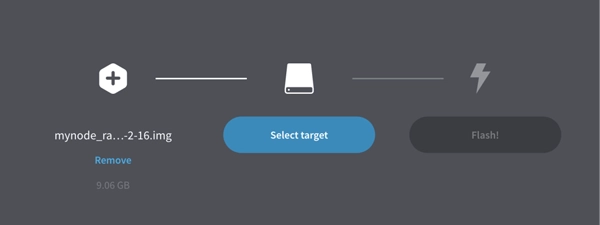
  1. Grab the latest myNode image for your hardware (Model One, Model Two, Pi, or x86).
  2. Flash it to a microSD or USB drive with Balena Etcher, then attach the SSD that will hold the blockchain.
  3. Label the boot media and the SSD so you can keep track of them during future migrations.

Gotcha: Slow cards or USB2 enclosures throttle initial sync speeds; use SSDs and USB 3.

2. Wire up the hardware

2. Wire up the hardware

Setup time: ~10 minCost: Hardware purchaseRisk: Low (follow manual)
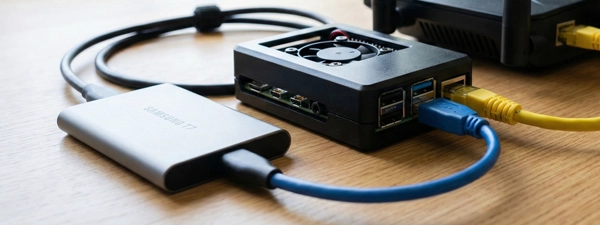
  1. Insert the SSD into the enclosure, plug it into the USB 3 port, and verify every connector is fully seated.
  2. Connect Ethernet between the node and your router or switch; Wi-Fi is not supported.
  3. Plug the power supply into the outlet and the device; Model Two also needs a tap on the power button.

Gotcha: Power cycling without a proper shutdown can corrupt the drive; use the UI to shut down first.

3. Complete onboarding at mynode.local

3. Complete onboarding at mynode.local

Setup time: ~10 minCost: FreeRisk: Low (browser-based)
  1. Visit `https://mynode.local/` (or the IP address) and log in with `admin` / `bolt`.
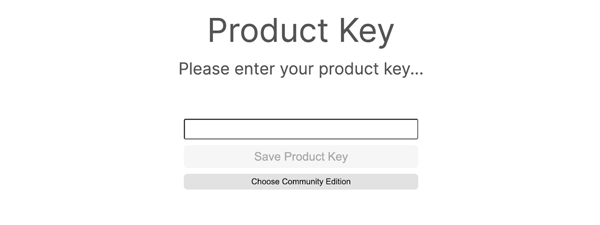
  2. Enter your product key for Premium or choose Community Edition to keep things free.
  3. Change the default password, record it in a password manager, and decide whether you want Tor or VPN enabled yet.

Gotcha: Leaving `admin` / `bolt` in place means anyone on your LAN can control the box.

4. Let it sync and secure services

4. Let it sync and secure services

Setup time: ~6 days on Pi hardwareCost: Electricity + internetRisk: Medium (power/network)
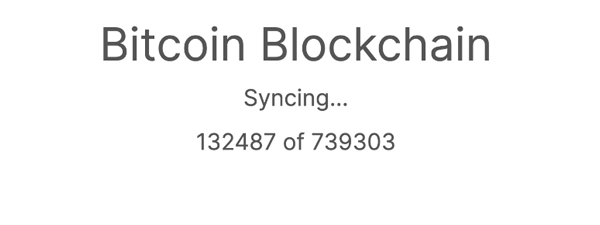
  1. Watch Bitcoin Core reach 100% before funding Lightning or pairing wallets.
  2. Install or unlock the bundled apps you need (Ride The Lightning, Mempool, Electrs, VPN).
  3. Download your Lightning channel backup and a system backup once you're happy with the setup.

Gotcha: Do not fund Lightning until Bitcoin Core is fully synced; invoices fail when the base node lags.

Quick answers

Can I skip the product key during setup?

Yes. Choose Community Edition on the onboarding screen; you can add the Premium key later without reinstalling.

Do I need to attach a monitor?

No. Everything happens over the web dashboard at mynode.local, though Model Two includes a power button if you like front-panel control.

Hardware BOM

Hardware BOM & capacity planning

MyNode ships its own hardware, but you can also flash the same software onto any supported Pi or mini PC. Choose the build that matches your budget, cooling, and the number of apps you plan to run.

Model One kit

$399

Plug-and-play Pi-class hardware.

Trade-off: You get curated hardware and a ready SSD → You give up PCIe upgrades and raw horsepower.
Monthly Cost ~$1.80/mo (15W)
Sync Time ~6 days Ships with microSD boot media, SSD enclosure, cooling, and Ethernet-ready cabling.
Storage 1 TB SSD included; keep at least 15% free for compaction.
Noise / Size Quiet desktop fan, router-sized footprint.
Gotcha: USB connections handle both power and data; loose cables can drop the drive mid-sync.
Bitcoin CoreLightningRTL
View parts list
  • Single-board computer with aluminum case
  • 1 TB SSD + USB 3.0 enclosure
  • 15W USB-C power supply
  • Gigabit Ethernet cable

Model Two workstation

$599

Higher-end CPU, NVMe, and front-panel power.

Trade-off: You pay more upfront → You get faster syncs and smoother multitasking.
Monthly Cost ~$3.50/mo (25W)
Sync Time ~48 hours Includes internal NVMe SSD plus boot media; still prefers wired Ethernet.
Storage 2 TB NVMe keeps Bitcoin Core, Electrs, and Mempool happy.
Noise / Size Desk-friendly with whisper fans.
Gotcha: Use the UI shutdown before hitting the physical power button to avoid disk checks.
ElectrsMempoolBTCPay
View parts list
  • x86 mini PC with 8–16 GB RAM
  • 2 TB NVMe SSD
  • Preloaded boot media
  • UPS or surge protection

DIY build

$250–$500 (varies)

Roll your own Pi 5 or N100 mini PC.

Trade-off: You save money by reusing gear → You must source SSDs, cooling, and reliable power yourself.
Monthly Cost ~$2–$5/mo
Sync Time ~12 hours on N100, ~6 days on Pi 4 Requires SSD storage over USB 3 or NVMe plus wired Ethernet.
Storage 1–4 TB SSD depending on whether you index Electrs or run media apps.
Noise / Size Depends on your case; plan for active cooling on Pi 5 builds.
Gotcha: Skipping a UPS risks corruption if power blips during the initial block download.
Bitcoin CoreElectrumMarketplace
View parts list
  • Raspberry Pi 5 (8 GB) or Intel N100 mini PC
  • 1–4 TB NVMe or SSD
  • Powered USB 3 enclosure
  • Fan or heat sink kit

Quick answers

Can I use Wi-Fi instead of Ethernet?

No. MyNode expects wired Ethernet so Tor, VPN, and Lightning remain stable.

Do I need a UPS?

Each build benefits from battery backup so you can shut down cleanly if power drops.

Can I upgrade storage later?

Yes. Clone the `/mnt/hdd/mynode` directory to a larger SSD, update mounts, and boot from the new drive.

Does Model One support accessory apps like Mempool?

It can run lighter apps, but heavy dashboards perform better on Model Two or an x86 DIY build.

Fees: what you pay and when

Costs & speed of operation

Initial sync time

One-time
6+ days on Raspberry Pi hardware (~48h on Model Two)
myNode factor: MyNode verifies each block locally and keeps apps locked until Bitcoin Core reaches tip.
THE MECHANICS

Bitcoin Core chews through 800k+ blocks while Tor connections discover peers and download headers.

OPTIMIZATION

Use wired Ethernet, SSD storage, and leave the node powered on 24/7.

Learn more

DIY x86 builds or Model Two hardware cut the initial block download to under two days.

Disk growth

Storage
550 GB today + 5–7 GB/month
myNode factor: MyNode keeps two copies of Lightning backups (SD + SSD) alongside the blockchain and optional apps.
THE MECHANICS

Full-history nodes store blocks, chainstate, Electrs indexes, and docker volumes for marketplace apps.

OPTIMIZATION

Allocate at least a 1 TB SSD or enable pruning if you only need wallet verification.

Learn more

Free 15% disk space before enabling heavy apps like Mempool or BTCPay.

Power consumption

Monthly
15–35 W ~$1.80–$4.00 / month
myNode factor: Dedicated hardware stays online for Tor, VPN, and Lightning channel health.
THE MECHANICS

The device idles low but ramps during compaction, Electrs indexing, or channel backups.

OPTIMIZATION

Prefer efficient boards (Pi 5 or N100), disable unused apps, and provide adequate cooling.

Learn more

Pair the node with a smart plug or UPS to monitor draw and automate safe shutdowns.

Bandwidth requirements

Network
600 GB initial download + 20–40 GB/mo
myNode factor: Tor plus VPN endpoints and Docker updates add overhead beyond Bitcoin gossip.
THE MECHANICS

The node fetches the blockchain, relays transactions, and downloads container updates for bundled apps.

OPTIMIZATION

Wire the device directly to your router and schedule large updates during off-peak ISP hours.

Learn more

If your ISP enforces data caps, throttle upload speeds inside Bitcoin Core once sync completes.

Quick answers

Does the Premium license change operating costs?

The license is a one-time $79 upgrade that unlocks extra apps and VPN access, but the ongoing power and bandwidth costs stay the same.

Can I power it down between sync sessions?

Yes, but always use the web UI’s shutdown button so the SSD and SD card unmount cleanly before you unplug it.

Key terms
Product key
A code you enter during onboarding to unlock myNode Premium features like VPN and extra marketplace apps.
Ride The Lightning (RTL)
A web UI bundled with myNode that lets you open channels, monitor liquidity, and pay invoices from LND.
VPN profile
An OpenVPN configuration file generated by myNode so you can connect remotely without exposing ports.
Network & Privacy

Network & Privacy

Who can see what when you use myNode

  • The dashboard listens on HTTP at `mynode.local` with `admin` / `bolt` defaults until you change them.
  • Bitcoin Core and Lightning traffic route over Tor, and you can optionally enable the built-in VPN server for remote control.
  • Static channel backups live both on the SSD and the boot media so you have redundancy if one drive fails.
Do: Keep the node behind your router, rotate passwords immediately, and use Tor or VPN instead of port forwarding.
Don't: Expose port 80 or 8333 directly to the internet or reuse the default credentials across other services.

Hardware failure? How MyNode recovery works

  • Download system backups and Lightning channel backups from the Settings panel after your initial setup.
  • Store the product key, passwords, and backup files offline so you can restore on fresh hardware.
  • Re-flash the latest image, upload your backups, and let Bitcoin Core rescan if you ever replace disks.
Do: Test a small restore on spare hardware or a VM so you know the flow before an outage.
Don't: Rely on the copy that lives only on the node; keep offsite duplicates.

Availability & safe installs

  • MyNode runs entirely on hardware you own, so jurisdictional limits tie to where devices can be shipped.
  • Tor remote access helps when your ISP uses CGNAT or blocks inbound ports.

Quick answers

Does MyNode phone home?

Core services run locally; Premium-only features call out when you activate licensing or updates.

Where are Lightning backups stored?

MyNode keeps two copies—one on the SD card and one on the SSD—so you can download either copy plus store one offline.

Can I delete my data completely?

Yes. Re-flash the image, wipe the SSD, and the device boots as a fresh install.

Key terms
bolt password
The default `admin` / `bolt` login that ships with every myNode until you change it.
onion address
Tor hidden service URL that lets you reach the dashboard or wallets without exposing clearnet ports.
Lightning & App support

Lightning & App support

Bitcoin Core + Tor defaults

Works

Full node Tor networking

MyNode installs Bitcoin Core with Tor enabled, so your node talks to peers privately while still letting you toggle pruning or full-history mode.

Show steps

Gotcha: Wi-Fi is unsupported; use wired Ethernet or peers will drop during IBD.

Lightning + RTL dashboard

Works

LND default Ride The Lightning

LND runs out of the box with Ride The Lightning so you can open channels, monitor liquidity, and use QR pairing without extra installs.

Show steps

Gotcha: Wait until the base node is synced before funding channels or payments will fail.

Electrum & explorers

Works

Electrum server BTC RPC Explorer

Electrum server and BTC RPC Explorer let you query your own balances and transactions without leaking data to public APIs.

Show steps

Gotcha: Electrum indexing needs ~150 GB beyond Bitcoin Core; plan SSD space accordingly.

App Marketplace

Works, with caveat

Bundled apps Premium unlocks more

The marketplace adds tools like Thunderhub, Mempool, BTC Explorer, VPN, and more with one click, and Premium unlocks the larger catalog.

Show steps

Gotcha: Some apps remain Premium-only, so budget the license if you need VPN or advanced monitoring.

Integrations

Integrations

MyNode exposes wallet pairing QR codes, VPN profiles, and Tor endpoints so you can connect wallets, merchants, and monitoring tools without trusting third parties.

Connect your wallet

Private

Use Electrum server so Sparrow, Specter, or BlueWallet ask your node—not a public server—for balances.

  1. Enable Electrum Server and wait for the index to finish.
  2. Copy the LAN address or Tor URI from the Electrum card.
  3. Paste it into your wallet’s network settings and disable auto servers.
Desktop (LAN)
mynode.local:50001
Mobile (Tor)
abc...onion:50001
See compatible apps
SparrowSpecter Desktop

Privacy: Wallet traffic stays between you and your node over LAN or Tor.

Remote Node Control

Private

Download the VPN profile or use Tor links so you can reach RTL or Thunderhub without opening ports.

  1. Enable VPN inside the dashboard and download the `.ovpn` file.
  2. Import it into OpenVPN or Tunnelblick on your phone or laptop.
  3. Connect and open `https://mynodevpn.com` or the Tor link to reach RTL.
VPN profile
mynode-vpn.ovpn
See compatible apps
ZeusThunderhub

Privacy: Traffic tunnels through your VPN or Tor circuit; nothing sits on a third-party server.

Merchant & Tools

Native

Install BTCPay, Mempool, or other marketplace apps that automatically connect to Bitcoin Core and LND.

  1. Open App Marketplace and install BTCPay Server or Mempool.
  2. Complete the in-app wizard; myNode injects the Bitcoin and Lightning connection info automatically.
  3. Expose services via Tor or VPN instead of public port forwarding.
BTCPay (LAN)
https://mynode.local:23000
See compatible apps
BTCPay ServerMempool.spaceThunderhub

Privacy: Customer and payment data stay on your hardware; no exchange sits in the middle.

Maintenance

Maintenance

Update Cadence Frequent community builds + Premium hotfixes
Rollback Re-flash SD (data safe on SSD)
Backups Channel backups (auto) + System archive
Data Path /mnt/hdd/mynode
Monitoring Dashboard / Ride The Lightning
Change default credentials

Every device ships with admin / bolt, so change it before exposing Tor or VPN.

  1. Log in to mynode.local and open Settings → Password.
  2. Create a long unique password and save it in a manager.
  3. Reboot to ensure the new password persists before enabling remote access.
Download Lightning backups

MyNode keeps redundant SCB files; you still need an offline copy if the hardware dies.

  1. Open LightningManage backups.
  2. Download the channel.backup file and store it offline.
  3. Repeat after every major channel change.
Run system backups

System backups capture app data and configs so you can restore after re-flashing.

  1. Go to System → Backup.
  2. Start a backup and wait for the archive to download.
  3. Store the archive with your Lightning backups.
Apply updates safely

Updates pull new Docker images and scripts; apply them when the node is idle.

  1. Check System Status for available updates.
  2. Read the changelog linked in the UI to see what changed.
  3. Apply the update and confirm Bitcoin Core resumes syncing.
Security Model

Security Model

MyNode assumes a trusted LAN with Tor and VPN options for remote access, but it still ships with default credentials you must change.

Quick Wins

  • Replace `admin` / `bolt` before you enable Tor or VPN.
  • Restrict dashboard access to a dedicated VLAN or subnet.
  • Export Lightning backups after each channel change.

Hardening

  • Disable apps you do not use to shrink the exposed surface.
  • Use WireGuard or Tailscale in front of the dashboard if you need clearnet access.
  • Put the node and SSD on a UPS so abrupt power loss cannot corrupt data.
Move your myNode wallet or funds

Move your myNode wallet or funds

Reuse an existing Bitcoin data directory

Time: ~1–3 hours (copy dependent)Cost: FreeRisk: Medium

Choose: Use this when migrating from another node so you don’t redownload the blockchain.

Show steps
  1. Shut down the old node and copy `blocks` + `chainstate` to external storage.
  2. Place the data inside `/mnt/hdd/mynode/bitcoin` on the new drive and ensure ownership belongs to the `bitcoin` user.
  3. Boot myNode and let Bitcoin Core verify the copied data before turning Lightning back on.

Tips: Match pruning mode between the old and new installs; full-history data cannot satisfy a pruned node.

Gotcha: Power loss during the copy can corrupt LevelDB; verify with `bitcoin-cli getblockcount` before swapping disks.

Migrate Lightning channels

Time: ~30–90 minCost: Mining fees for closesRisk: Medium

Choose: Use this after hardware failure or when moving from Community Edition to Premium hardware.

Show steps
  1. Download the latest `channel.backup` from your old node.
  2. Install myNode on the replacement hardware, open Lightning, and upload the backup file.
  3. Wait for on-chain settlements, then re-open channels once balances settle.

Tips: Keep backups on multiple media so you are never stuck with the copy on the failed drive.

Gotcha: Running two LND instances with the same seed will desync channels; only restore once.

Upgrade to a larger SSD

Time: ~1–2 hoursCost: New SSDRisk: Low

Choose: Use this when you are close to filling the internal SSD or want room for more apps.

Show steps
  1. Shut down myNode and connect both the old and new SSD to a computer.
  2. Clone `/mnt/hdd/mynode` to the new drive with `rsync -aHAX` or your favorite disk tool.
  3. Update mounts or UUIDs, connect the new drive to your node, and boot.

Tips: Use powered USB enclosures when cloning NVMe drives so they don’t brown out mid-transfer.

Gotcha: Forgetting to update fstab leaves myNode writing to the old disk; double-check paths before rebooting.

Release & Trust

Release & Trust

Development activity

Latest myNode builds are published on GitHub Releases with changelog notes for each image.

Release notes
Open source

Core scripts and Docker definitions live in the open on GitHub under the myNode repository.

GitHub repo
Publisher

Official getting-started documentation is hosted on MyNode’s GitHub Pages site.

Docs
Profile

Profile

Founder(s)
Taylor Helsper
Taylor Helsper
Company description

MyNode is a turnkey Bitcoin and Lightning node platform that combines open‑source software with a polished, full‑featured web interface, making it accessible to both novices and advanced users.

MyNode is a turnkey Bitcoin and Lightning node platform that combines open‑source software with a polished, full‑featured web interface, making it accessible to both novices and advanced users.

Founded in
2019
Website

FAQs

How do MyNode hardware options compare between Model One and Model Two?

Model One bundles the single-board computer, SSD enclosure, and cabling so you plug it in and let it sync, while Model Two adds internal NVMe storage, a power button, and more CPU headroom for heavy apps. Pick the chassis that matches how much routing, indexing, or marketplace usage you expect to run.

Is MyNode free or do I need a Premium license?

The Community Edition download is free and already runs the Bitcoin, Lightning, and Tor stack, and the $79 Premium key unlocks extra marketplace apps, VPN profiles, and direct support. You can start with the free build and upgrade later without reinstalling.

How long does the initial MyNode sync take?

MyNode verifies every block from genesis on your hardware, so Raspberry Pi builds often need six or more days before Bitcoin Core reaches tip. Leave it wired and powered 24/7 or move to an x86 mini PC if you want that first sync to finish faster.

What default credentials and product keys should I expect on first boot?

The dashboard lives at mynode.local with `admin` / `bolt` as the default login and immediately asks for your product key or the Community Edition option, so anyone on your LAN could log in until you change it. Swap the password, store the key safely, and only then expose Tor or VPN access.

How do I reach MyNode remotely once it is online?

MyNode generates Tor onion links and downloadable VPN profiles so you can reach Ride The Lightning or the main UI without opening clearnet ports. Import the OpenVPN file or use the Tor URL in your wallet when you need to manage channels away from home.

×

Rate this service

Alternatives to myNode