Start9 Review: Fees, Features & Setup Guide

Updated: November 2025

Quick verdict

positive icon Best for: People who want StartOS to orchestrate Bitcoin, Lightning, and self-hosted apps while everything runs on their own metal.

neutral icon Consider if: You want a curated, signed marketplace and Tor-ready remote access on a dedicated private server (plug-and-play or DIY).

negative icon Not ideal when: You expect Raspberry Pi hardware to power a Bitcoin stack despite Start9’s warning, or you require fully permissive open-source licensing.
Getting started

Set up your StartOS server

1. Flash the StartOS image

1. Flash the StartOS image

Setup time: ~20 minCost: FreeRisk: Medium (erases target media)
  1. **Skip this step** if you bought a Server One or Server Pure (it comes pre-flashed).
  2. Download the latest `startos-...img.gz` release from GitHub and optionally verify the SHA256 hash.
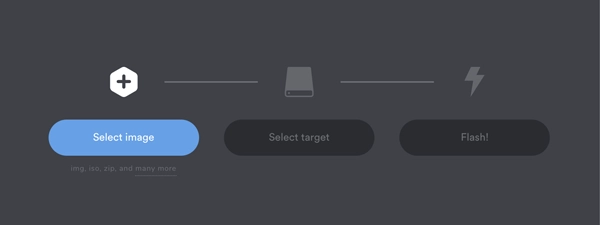
  3. Write the image to a microSD card or USB SSD with balenaEtcher, just as the flashing guide outlines.

Gotcha: Start9 reminds you that reflashing an SD card will erase every byte on it, so pull data you need before writing the image.

2. Boot and visit start.local

2. Boot and visit start.local

Setup time: ~10 minCost: Existing hardwareRisk: Low (guided setup)

Initial sync: Initial block download can take many hours on SSD-based x86 hardware and is unreliable on Raspberry Pi kits.

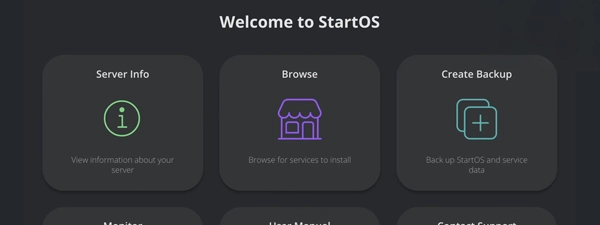
  1. Connect the server to power plus Ethernet, keep your laptop/phone on the same LAN, and open `https://start.local`.
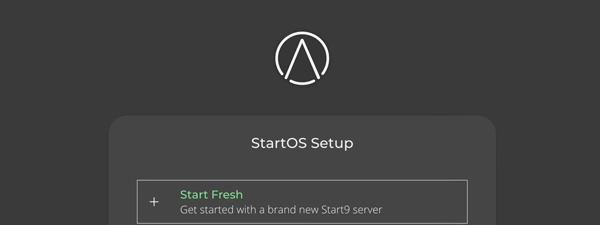
  2. Choose Start Fresh or the Recovery path, then follow the on-screen prompts to provision the OS.
  3. If you are migrating, pick Use Existing Drive or Transfer to reuse your previous data set.

Gotcha: The DIY guide explicitly warns that Raspberry Pi builds stall on Bitcoin workloads, so treat Pi as a light-duty appliance.

3. Trust the Root CA

3. Trust the Root CA

Setup time: ~5 minCost: FreeRisk: Low
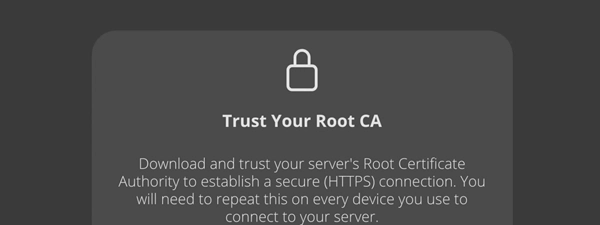
  1. Download the server’s Root CA during onboarding, from the startos-info file, or later via System → Root CA.
  2. Import the certificate using the Linux, Mac, Windows, Android, or iOS guides so browsers accept your `.local` sites.
  3. Keep a copy handy so you can share it with every device that needs HTTPS access to StartOS.

Gotcha: Tor Browser ignores `.local` addresses, so trust the certificate in a standard browser on the LAN first.

4. Install services from the Marketplace

4. Install services from the Marketplace

Setup time: ~15 min per serviceCost: Depends on the appRisk: Low (signed registries)
  1. Open Marketplace → Change to view Start9 and Community registries or add your own signed registry.
  2. Install Bitcoin Core, Lightning, Electrs, Nextcloud, Vaultwarden, or other apps, then pin their widgets on the dashboard.
  3. Use Service Dashboard, Actions, and Logs to monitor each container and keep an eye on shared storage under System.

Gotcha: Apps share CPU, RAM, and disk, so watch System → Storage before enabling heavy indexes or photo libraries.

Quick answers

Can I reuse an existing StartOS data drive?

Yes. During onboarding choose Recover → Use Existing Drive so the wizard mounts your old data disk and recreates the server with new credentials.

How do I grab the Root CA again later?

Go to System → Root CA, download the certificate, and send it to any device that needs trusted HTTPS access.

Hardware BOM

Hardware options

Start9 offers plug-and-play servers with lifetime support, or you can build your own using commodity hardware. Official servers guarantee compatibility; DIY builds save money but require you to manage the hardware.

Server One

$699

The standard for sovereign computing.

Trade-off: You pay a premium upfront → You get a tested, plug-and-play device with lifetime support.
Monthly Cost Low (Mobile processor)
Sync Time Fast (NVMe pre-synced option available) Includes power & cables. Just add Ethernet.
Storage 2 TB NVMe included (expandable).
Noise / Size Near silent active cooling.
Gotcha: Higher entry cost than a DIY mini-PC.
Bitcoin CoreLightningAI Services
View parts list
  • AMD Ryzen 7 5825U (8-core)
  • 16 GB DDR4 RAM
  • 2 TB NVMe SSD
  • Custom aluminum chassis

Server Pure

$899

Auditable firmware for maximum security.

Trade-off: You pay for open hardware → You remove Intel ME and closed-source firmware risks.
Monthly Cost Moderate (Performance CPU)
Sync Time Fastest For users who need hardware-level trust.
Storage 2 TB NVMe included.
Noise / Size Quiet active cooling.
Gotcha: Overkill unless you specifically need open firmware.
Coreboot / HeadsIntel ME DisabledTamper evident
View parts list
  • Intel Core i7 (10th Gen)
  • 32 GB DDR4 RAM
  • 2 TB NVMe SSD
  • Open-source firmware

DIY x86 Build

$250–$400

Build it yourself to save cost.

Trade-off: You save money → You handle assembly, flashing, and hardware troubleshooting.
Monthly Cost Varies by hardware
Sync Time 12–24 hours Requires N100 or better + SSD.
Storage 1 TB SSD minimum.
Noise / Size Varies by case.
Gotcha: Start9 support covers the OS, not your hardware quirks.
Custom HardwareBudget FriendlyFlexible
View parts list
  • Mini PC (N100/Ryzen)
  • 16 GB RAM recommended
  • 1 TB+ NVMe SSD
  • Ethernet cable

Quick answers

Can I still use a Raspberry Pi?

Yes, but Start9 warns that Pis struggle with Bitcoin workloads. Use them for lighter apps or lab testing only.

What is the advantage of Server Pure?

Server Pure runs Coreboot and has Intel Management Engine disabled, minimizing the risk of hardware-level backdoors.

Fees: what you pay and when

Costs & speed of operation

Initial sync time

One-time
Hours (x86) / Days (Pi) Fast on Server One/Pure or NVMe builds; very slow on Raspberry Pi.
Start9 factor: StartOS runs a full Bitcoin Core node. It must verify the entire chain before you can use Lightning.
THE MECHANICS

The node downloads and validates ~600GB of history. This is CPU and disk intensive.

OPTIMIZATION

Use an NVMe SSD and wired Ethernet. If migrating, use the 'Recover' option to reuse existing data.

Learn more

Server One and Pure come with NVMe drives that handle this workload easily.

Disk growth

Storage
600 GB currently + 5–7 GB/month
Start9 factor: Unified storage means media apps (Photos/Files) compete directly with chain data.
THE MECHANICS

Full-history nodes store the entire blockchain plus Lightning databases, logs, and app containers on your local drive.

OPTIMIZATION

Allocate at least a 1 TB SSD for full archival, or enable pruning to fit on smaller drives.

Learn more

You can upgrade storage later using the 'Transfer Data' wizard.

Power consumption

Monthly
15–25 W Server One / Pure (similar to a laptop)
Start9 factor: StartOS runs 24/7 to route payments and serve apps, but uses efficient mobile processors.
THE MECHANICS

The device draws continuous power. Server One/Pure are far more efficient than a desktop tower.

OPTIMIZATION

Stick to official hardware or N100 mini-PCs. Old desktops can draw 100W+ idle.

Learn more

StartOS manages CPU scaling automatically to save power when idle.

Bandwidth requirements

Network
600 GB Initial download + ~50GB/mo gossip
Start9 factor: Bitcoin Core gossip and StartOS system updates consume significant data.
THE MECHANICS

The node stays in sync with the network. Backups to remote locations also use upload bandwidth.

OPTIMIZATION

Use wired Ethernet. If your ISP has caps, schedule backups for off-peak hours.

Learn more

Initial sync is the heaviest load; daily usage is light for most home connections.

Quick answers

Can I back up to a thumb drive?

StartOS strongly discourages low-quality flash media; the backup guide says to use high-endurance SSDs or SMB folders so archives stay intact.

What if my new disk is larger than the old one?

Follow the Transfer Data guide, which copies your data from the old drive to the new SSD before recreating the server.

Key terms
Root Certificate Authority (Root CA)
A certificate you download from StartOS and import on every device so `.local` services open over HTTPS without warnings.
Service registry
A signed catalog (Start9, Community, or custom) that the Marketplace uses to download `.s9pk` service packages.
.onion URL
A Tor-only address for the StartOS dashboard or an installed service so you can connect remotely without port forwarding.
Privacy & jurisdiction

Privacy & jurisdiction

Who can see what when you use Start9

  • LAN access uses `.local` URLs secured by your trusted Root CA, so only devices on the same network can reach the dashboard over HTTPS.
  • Remote access happens through per-service Tor `.onion` URLs, which stay private as long as you keep the addresses to yourself.
  • Native apps either embed Tor or rely on system-wide Tor proxies, so follow the platform guides before exposing credentials.
Do: Trust the Root CA on every device, keep the server behind your router, and use Tor Browser or Tor-enabled apps for remote sessions.
Don't: Skip the certificate import, open `.local` URLs from Tor Browser, or expose StartOS to the clearnet without a proxy.

Hardware failure? How StartOS recovery works

  • If the OS drive fails, flash StartOS, choose Recover, and point it at your existing data drive or encrypted backup archive.
  • Use Transfer mode to copy data from an old disk to a larger new one without changing your Tor or LAN addresses.
  • Store multiple backup targets—physical and network—so you always have a clean copy to restore.
Do: Test a restore path before you need it and keep powered USB enclosures handy for migrations.
Don't: Trust a single low-quality flash drive; Start9 explicitly warns backups need SSD-class media.

Availability & safe installs

  • StartOS runs entirely on your hardware, so jurisdictional exposure is limited to where you host the server.
  • Tor connectivity means you do not need ISP port forwards or public IPs to reach the services remotely.

Quick answers

Does StartOS support VPN remote access?

Not yet—the remote access guide says VPN support is coming in a future release, so for now stick to Tor `.onion` URLs.

Why do I need Bonjour on Windows?

Windows lacks `.local` discovery by default, so the LAN guide instructs you to install Bonjour Print Services before opening StartOS over HTTPS.

Key terms
Root CA
A certificate authority file you download from StartOS and import on your devices so `.local` dashboards load over HTTPS without warnings.
.onion URL
A Tor-only address that lets you reach the StartOS dashboard or any installed service from anywhere without exposing your IP.
Lightning & service support

Lightning & service support

StartOS marketplace

Works

Signed registries Community catalogs

Marketplace ships with Start9 and Community registries and lets you add custom URLs or even host your own `.s9pk` packages.

Show steps

Gotcha: Start9 can’t support third-party registries; verify packages before installing anything outside the official catalog.

Bitcoin Core manager

Works

Full node Reuse drives

Bitcoin Core installs from the Marketplace and the recovery guides show how to reuse an existing chainstate instead of re-downloading.

Show steps

Gotcha: Flashing StartOS wipes the OS disk, so keep backups and verify you selected the right drive before writing.

Lightning daemons

Works

LND Core Lightning

StartOS ships LND by default and the Lightning guides cover CLN, LNbits, AlbyHub, and remote wallets.

Show steps

Gotcha: After migrating, never restart the old node or it may broadcast stale channel states and cost you funds.

Electrum & RPC bridges

Works

Electrs Explorer APIs

Electrs, RPC bridges, and explorer apps live in the Marketplace so you can pair StartOS with Sparrow, Specter, or BTCPay.

Show steps

Gotcha: Electrs needs as much disk as Bitcoin plus its own index, so ensure the SSD has headroom before enabling it.

Integrations

Integrations

Your node replaces the cloud when you wire wallets, remote control apps, and merchant tools straight to StartOS.

Connect your wallet

Private

Use the Bitcoin Integrations guide to point Sparrow, Specter, or other Electrum-compatible wallets at your own Electrs index.

  1. Install Electrs from the Marketplace and wait for the index to complete.
  2. Open the service details to copy the LAN SSL endpoint or the Tor address.
  3. Paste the endpoint into your wallet’s server settings after trusting the Root CA.
LAN SSL
https://start.local:50001
Tor (example)
electrsxxxxxxxx.onion:50001
See compatible apps
SparrowSpecter Desktop

Privacy: Your wallet now queries your own node, not third-party servers.

Remote node control

Private

Lightning guides show how to pair Zeus, AlbyHub, or LNbits via REST, Tor, or Lightning Node Connect.

  1. Install the Lightning service but keep it offline until migration or channel setup is ready.
  2. Run the migration action for your old node, entering its LAN IP and passwords.
  3. Scan the LNDconnect string or LNC QR code from StartOS inside Zeus or AlbyHub.
LNDconnect (example)
lndconnect://abcd1234.onion:8080?macaroon=...&cert=...
See compatible apps
ZeusAlby Hub

Privacy: All traffic routes over Tor so no VPN or port forwarding is required.

Merchant & tools

Native

Install BTCPay Server, LNbits, or other Marketplace apps so your storefronts talk directly to Bitcoin Core and Lightning.

  1. Browse the Marketplace for apps like BTCPay, LNbits, Nextcloud, or Vaultwarden.
  2. Install the service, review the Service Dashboard to confirm dependencies, and copy its `.local` or `.onion` URL.
  3. Pin the widget on the StartOS dashboard so you can monitor resource usage.
BTCPay (example)
https://start.local:49392
See compatible apps

Privacy: Customer data never leaves your hardware unless you explicitly share it.

Maintenance

Maintenance

Update Cadence OS + Service Updates (Independent)
Rollback Re-flash SD (Data Safe)
Backups Full System (Encrypted) to USB/NAS
Data Path Encrypted Volume (Managed)
Monitoring Dashboard / Service Logs
Create System Backup

Backups are your safety net; Start9 warns against cheap thumb drives.

  1. Navigate to System → Create Backup.
  2. Pick a physical SSD or pre-configured network folder and select the services you want to protect.
  3. Enter the master password and let the archive complete before disconnecting the drive.
Test Restore Procedure

A backup is only useful if you know how to restore it.

  1. Flash StartOS on spare hardware or a VM.
  2. Choose Recover → Restore from Backup and point to your encrypted archive.
  3. Verify the restored services start before wiping the test device.
Manage Registries

Registries are critical infrastructure—track what you trust.

  1. Open Marketplace → Change and confirm which registries are enabled.
  2. Remove registries you no longer need and document any custom URLs.
  3. Check System → Updates before installing new builds, especially on production nodes.
Distribute Root CA

Every device that hits StartOS over HTTPS needs the Root CA.

  1. Go to System → Root CA and download the certificate.
  2. Transfer it securely (AirDrop, USB, encrypted chat) to other devices.
  3. Follow the OS-specific instructions so browsers trust your .local sites.
Security Model

Security Model

StartOS assumes a trusted LAN secured by your Root CA for local access and Tor `.onion` URLs for remote sessions.

Quick Wins

  • Import the Root CA on every device so `.local` dashboards load over HTTPS.
  • Keep the server on wired Ethernet behind your router and avoid exposing clearnet ports.
  • Use Tor Browser or Tor-enabled apps when you are off-network.

Hardening

  • Favor powered SSD enclosures or high-endurance microSD cards as Start9 recommends, especially on Pi-class hardware.
  • Maintain multiple backup targets (physical and SMB) so you have options if a drive dies.
  • Treat third-party registries cautiously; verify `.s9pk` signatures before installing.
Move your Start9 wallet or funds

Move your Start9 wallet or funds

Reuse an existing data drive

Time: ~10–20 minCost: FreeRisk: Low

Choose: Use this when you re-flash StartOS but want to keep the previous data disk.

Show steps
  1. Flash StartOS, choose **Recover**, and select **Use Existing Drive**.
  2. Pick the correct data disk from the list (refresh if necessary).
  3. Set a new master password and let StartOS re-initialize with your old data.

Tips: Label your drives so you never confuse the old and new disks.

Gotcha: Selecting the wrong drive will erase it; double-check before confirming.

Transfer data to a new drive

Time: ~1–24 hours (size dependent)Cost: New SSDRisk: Medium

Choose: Use when you are upgrading to a larger SSD or moving to new hardware.

Show steps
  1. Shut down the server, install the new internal drive, and connect the old drive via USB.
  2. Flash StartOS, choose **Recover → Transfer**, and select the old drive as the source and the new drive as the destination.
  3. Enter your master password and let the migration finish; StartOS keeps your Tor/LAN addresses intact.

Tips: Use the fastest USB enclosure you have to shorten the copy window.

Gotcha: The guide warns that multi-terabyte copies can take many hours—leave the system powered the whole time.

Migrate LND to StartOS

Time: ~15–30 minCost: FreeRisk: Medium

Choose: Use when you are moving LND funds from Umbrel, RaspiBlitz, or myNode without closing channels.

Show steps
  1. Install the Lightning service on StartOS but do not start it; the wallet must be untouched.
  2. Run the migration action for your old node, entering its LAN IP and passwords.
  3. Once StartOS reports success, power down the old node and then start Lightning on StartOS.

Tips: Keep both nodes on the same LAN so the migration script can reach the old REST API.

Gotcha: Never restart the old node after migrating—broadcasting stale states could cost you funds.

Release & Trust

Release & Trust

Development activity

Docs cover StartOS 0.3.5.x with up-to-date user manual links.

Documentation
Open source

Source-available StartOS builds ship via the official GitHub releases.

GitHub releases
Security & compliance

Root CA & Tor connection guides help you secure LAN and remote access.

Root CA guide
Profile

Profile

Founder(s)
Matt Hill
Matt Hill
Company description

Start9 (Start9 Labs) is the creator of the Embassy—a turnkey, self-hosted personal server and Bitcoin stack powered by their open-source StartOS. Their mission is to eliminate reliance on centralized ...

Start9 (Start9 Labs) is the creator of the Embassy—a turnkey, self-hosted personal server and Bitcoin stack powered by their open-source StartOS. Their mission is to eliminate reliance on centralized third parties, placing privacy, decentralization, and individual autonomy at the forefront. Unlike other DIY solutions, Start9 aims to "level the playing field," offering plug-and-play hardware kits (like Server One and Server Pure) or a do-it-yourself image for Raspberry Pi or x86, all fully supported by their first-class community and expert support team.

Founded in
2020
Website

FAQs

How do I reach the StartOS dashboard on day one?

Connect your Server One, Server Pure, or DIY box to power plus Ethernet, keep your laptop or phone on the same LAN, and visit `https://start.local` to run the Start Fresh wizard. The UI walks you through choosing Start Fresh or Recovery so the device can provision itself.

How do Start9 backups work?

Open System → Create Backup, pick a physical drive or SMB network folder, enter your master password, and StartOS writes an encrypted archive while warning you to favor high-endurance storage. You can continue using the server while the job runs and confirm the timestamp under System → Backups.

How do I trust the StartOS Root CA for HTTPS?

Download the Root CA during onboarding, from the startos-info file, or later via System → Root CA, then follow the Linux/Mac/Windows/Android/iOS instructions to import it. Once installed, browsers open your `.local` URLs over HTTPS without warnings.

What hardware does StartOS support?

StartOS boots on Raspberry Pi and most x86_64 hardware, but the DIY guide warns Pis struggle with Bitcoin workloads, so plan for at least 8 GB of RAM and a 1 TB SSD on x86 if you need a full node. Lightweight services like password vaults or file shares can still live on Pi kits using high-endurance microSD cards.

How do I recover after a disk failure?

Flash StartOS, choose Recover, then pick Use Existing Drive, Transfer, or Restore from Backup to load your encrypted data onto the new disk. Transfer mode copies everything from the old drive to a larger replacement so your Tor and LAN addresses remain unchanged.

×

Rate this service

Alternatives to Start9