Umbrel Review: Fees, Features & Setup Guide

Updated: November 2025

Quick verdict

positive icon Best for: People who want a guided home server to run Bitcoin, Lightning, and household apps without SSH.

neutral icon Consider if: You like plug-and-play UX but still want Tor routing, Electrs, and containerized services under your roof.

negative icon Not ideal when: You require fully open-source licensing, HTTPS-by-default, or granular control over every dependency.

Getting started

Getting Started

1. Download & Flash

1. Download & Flash

Setup time: ~20 minCost: Free (Software)Risk: Medium (Wipes drive)
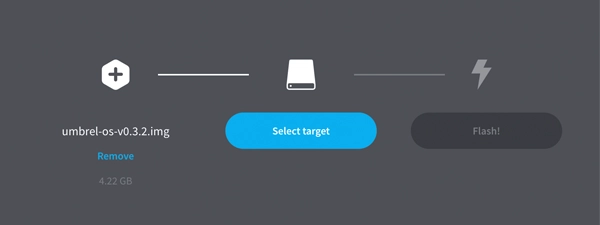
  1. Download the correct **umbrelOS** image for your device (Raspberry Pi, x86, or Linux) from the GitHub releases page.
  2. Connect your storage drive to your computer and use **Balena Etcher** to flash the OS image.
  3. Insert the drive into your node hardware and connect it to your router via Ethernet.

Gotcha: Flashing completely wipes the target drive. Back up any existing data before you proceed.

2. First boot & account setup

2. First boot & account setup

Setup time: ~10 minCost: FreeRisk: Low
  1. Power on your device and visit `https://umbrel.local` on a computer connected to the same network.
  2. Follow the setup wizard to choose your node name and create a password.
  3. Write down your 24-word recovery phrase on paper—this is your only backup if the hardware fails.

Gotcha: Never save your seed phrase digitally or share it. Anyone with these words can steal your funds.

3. Install the essentials

3. Install the essentials

Setup time: ~5 min activeCost: FreeRisk: Low

Initial sync: 3–7 days (Hardware dependent)

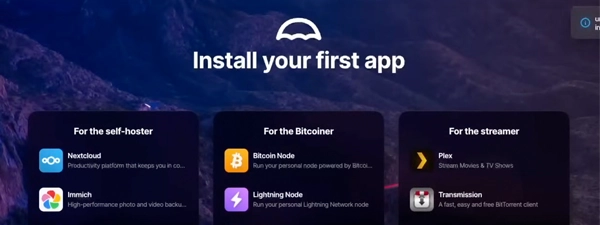
  1. Open the App Store from the dashboard—Umbrel starts empty so you can choose your own stack.
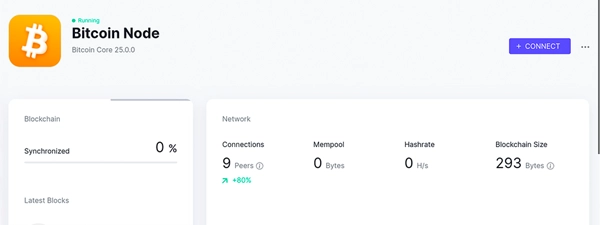
  2. Install the **Bitcoin Node** app first to begin the initial block download.
  3. Install **Lightning Node** once the Bitcoin sync starts to prepare for payments.

Gotcha: The initial sync can take 3–7 days on a Raspberry Pi. Your node is not broken; it is verifying history.

4. Connect your wallet

4. Connect your wallet

Setup time: ~15 minCost: FreeRisk: Low
  1. Open the **Bitcoin Node** app settings to find your RPC credentials or Tor address.
  2. In your phone or desktop wallet (like Sparrow or Bitkey), update the server settings to point to your new node.
  3. Verify the connection to ensure your transactions are broadcast and verified by your own hardware.

Gotcha: Your RPC credentials provide full access to your node. Keep them private and never share them.

Quick answers

Can I reuse an external SSD that already holds blockchain data?

Yes. Copy the existing `bitcoin` directory into `/home/umbrel/umbrel/bitcoin` before first boot to save days of syncing.

Does Umbrel require a static IP?

No, but reserving a DHCP lease keeps Onion links, Electrs endpoints, and wallet connections predictable.

Hardware BOM

Hardware BOM & capacity planning

Umbrel runs on hardware you control. That means you choose the trade-offs between noise, cost, and performance. Pick a build that matches your app usage, but prioritize SSD storage and a wired connection to keep the node healthy.

Budget Pi kit

$180–$220

Low-cost entry, but limited headroom.

Trade-off: You save money upfront → You risk sync stalls on heavy apps like Mempool.
Monthly Cost ~$1.30/mo (10W)
Sync Time 5–7 days Requires wired Ethernet + NVMe SSD (SD cards will fail).
Storage 1 TB NVMe (Full history) or 500GB (Pruned).
Noise / Size Low noise (<30dB fan), tiny footprint.
Gotcha: Pi 4/5 shares bandwidth between USB and Network, which bottlenecks the initial sync.
Bitcoin CoreLightningBasic Apps
View parts list
  • Raspberry Pi 5 or 4 (8 GB RAM)
  • 1 TB NVMe SSD in USB 3.2 enclosure
  • Active cooling case or fan hat
  • 15W USB-C power supply

Quiet mini-PC

$250–$350

The daily driver standard.

Trade-off: You pay slightly more → You get instant dashboard loads and reliable indexing.
Monthly Cost ~$3.25/mo (25W)
Sync Time 12–18 hours Fast internet (>100Mbps) + SSD over SATA/NVMe.
Storage 2 TB NVMe (Allows Electrs index + Media apps).
Noise / Size Silent (Fanless chassis available), router-sized.
Gotcha: Requires flashing an OS image to internal disk (wipes the drive).
ElectrsMempoolPost-Mix ToolsMedia Apps
View parts list
  • Intel N100 / N305 mini PC with 16 GB RAM
  • 2 TB NVMe SSD
  • Silent heatpipe chassis
  • Battery-backed NVMe enclosure for backups

Power user workstation

$500+

Commercial-grade throughput.

Trade-off: High power/cost → You run everything without lag.
Monthly Cost ~$9.00/mo (70W peak)
Sync Time 8–10 hours Gigabit fiber + high-end NVMe raid.
Storage 4 TB NVMe (Mirrored RAID 1 recommended).
Noise / Size Audible fans (35dB+), desktop tower size.
Gotcha: Overkill for just Bitcoin; only build this if you host AI models or 50+ apps.
BTCPay ServerLLM AI ModelsHigh-Vol Routing
View parts list
  • Ryzen 7 / Intel i7 SFF box with 32 GB RAM
  • 4 TB NVMe or SATA SSD (mirrored)
  • Managed switch + VLAN-aware router
  • UPS with network card

Quick answers

Is a Raspberry Pi 5 worth it over a Pi 4?

Yes. The PCIe bus on the Pi 5 allows much faster NVMe speeds, cutting sync times by ~30% compared to the Pi 4's USB bottleneck.

Do I really need an SSD?

Absolutely. HDDs cannot handle the random I/O required for block verification; your node will stall and never catch up to the tip.

Can I start small and upgrade?

Yes. You can migrate your data directory from a Pi to a Mini-PC later, but start with at least a 1TB drive to avoid painful migrations.

How much bandwidth does a node use?

Expect ~600GB for the initial download, then 20-50GB/month for gossip. Check your ISP data caps.

Fees: what you pay and when

Costs & speed of operation

Initial sync time

One-time
5–6 days on Pi 4 (or ~12h on Mini-PC)
Umbrel factor: Apps remain locked until 100% sync to ensure dependency integrity.
THE MECHANICS

Bitcoin Core verifies every block from genesis on your hardware (CPU + disk-IO bound).

OPTIMIZATION

Leave it on, use wired Ethernet, and prefer SSDs over HDDs.

Learn more

Pause heavy App Store installs until Bitcoin Core reaches tip; Lightning depends on a fully synced node.

Disk growth

Storage
550 GB currently + 5–7 GB/month
Umbrel factor: Unified storage means media apps (Immich/Nextcloud) compete directly with chain data.
THE MECHANICS

Full-history nodes store the entire blockchain plus Lightning databases, logs, and app containers on your local drive.

OPTIMIZATION

Allocate at least a 1 TB SSD for full archival, or enable pruning to fit on smaller drives.

Learn more

Keep >15% free space in `/home/umbrel/umbrel/bitcoin/blocks` so compaction never stalls.

Power consumption

Monthly
10–30 W ~$1.30–$3.90 / month
Umbrel factor: UmbrelOS disables disk spin-down to maintain instant Lightning routing response.
THE MECHANICS

Your node stays online 24/7 to verify blocks and route payments, drawing continuous power.

OPTIMIZATION

Use efficient N100 hardware or under-volt your Pi to keep carrying costs low.

Learn more

Pair the node with a smart plug or UPS that reports load so you can budget uptime.

Bandwidth requirements

Network
600 GB initial download + 30GB/mo
Umbrel factor: Background Docker image updates add substantial usage beyond chain gossip.
THE MECHANICS

The node peers with the network to relay blocks and gossip, using significant upstream bandwidth.

OPTIMIZATION

Use a wired connection and set upload caps in Bitcoin Core if your ISP limits data.

Learn more

ISPs with 1 TB caps may throttle after long IBD sessions; consider fiber or business-class plans.

Quick answers

Can I pause the initial block download without corrupting data?

Yes. Shut down from Settings → System before powering off; Bitcoin Core resumes where it left off as long as the SSD stays connected.

What happens when my SSD fills up?

Umbrel warns you at ~85% usage. Add a larger disk and migrate the `/home/umbrel/umbrel` directory before the drive hits 100% or Bitcoin Core will halt.

Key terms
Static channel backup (SCB)
Encrypted snapshot of your Lightning channels you import if the node fails.
Initial block download (IBD)
The first sync where Bitcoin Core verifies every block since 2009.
Uninterruptible power supply (UPS)
Battery pack that keeps the node online long enough for safe shutdowns.
Network & Privacy

Network & Privacy

Who can see what when you use Umbrel

  • The dashboard listens on HTTP inside your LAN; remote access should route over Tor or a VPN tunnel to avoid exposing logins.
  • Each App Store container may open additional ports—review them before forwarding anything past your firewall.
  • Umbrel’s optional telemetry is opt-in; leave it disabled if you want the node completely local.
Do: Keep the device behind a router, enable Tor remote access, and rotate credentials that ship with defaults.
Don't: Expose `umbrel.local:80` directly to the internet or reuse the same password across Thunderhub, Lightning Terminal, and the base OS.

Hardware failure? How Umbrel recovery works

  • System backups live under `Settings → Backup`; store a copy off-device together with your Lightning SCB file.
  • To restore, flash the latest image, drop your backup archive plus `channel.backup` into `/home/umbrel/umbrel/backups`, and follow the wizard.
  • If the hardware dies without a recent SCB, force-close channels from peers or use watchtower data where available.
Do: Test restores on spare hardware or a VM so you understand the flow before an outage.
Don't: Rely solely on Umbrel’s cloud-encrypted SCB—keep your own copy.

Availability & safe installs

  • Umbrel runs entirely on your hardware, so jurisdictional limits tie to hardware import rules rather than app access.
  • Tor helps when your ISP uses CGNAT; you can still reach the node remotely without opening ports.

Quick answers

Does Umbrel support HTTPS?

Not out of the box; front it with Caddy, Traefik, or Tailscale funnel if you need TLS and granular access control.

Can ISPs see what I'm hosting?

They see encrypted Bitcoin traffic and Tor circuits, but not the app data itself—still, avoid exposing clearnet ports.

Where are SSH keys stored?

Umbrel disables SSH by default; when enabled, keys live under `/home/umbrel/.ssh` so you can rotate them like any Linux host.

Key terms
CGNAT
Carrier-grade NAT that prevents inbound port forwards; Tor or VPN tunnels bypass it.
SCB
Static Channel Backup—an encrypted snapshot of your Lightning channels you need after catastrophic loss.
Lightning & App support

Lightning & App support

Bitcoin Core

Works

Full node Prune option

Bitcoin Core runs as a managed container with pruning support so you can trade disk space for faster syncs when needed.

Show steps

Gotcha: Pruned nodes cannot serve the full blockchain to Electrs; keep at least 1 TB for full-history mode.

Lightning

Works, with caveat

LND default CLN via community app

Umbrel ships with LND by default for compatibility with Zeus, Thunderhub, and Lightning Terminal, while Core Lightning arrives via community apps if you prefer plugin-based workflows.

Show steps

Gotcha: Switching between LND and CLN requires closing channels or migrating SCBs; plan before deleting containers.

Electrum / Electrs

Works

Electrs EPS

Electrs indexes your chain locally so Sparrow, Specter, or BlueWallet can query your node without leaking addresses.

Show steps

Gotcha: Electrs needs as much disk as Bitcoin Core plus ~150 GB index overhead.

App Marketplace

Works

100+ apps 1-click updates

The curated marketplace lets you add services like Nextcloud, Immich, or Home Assistant alongside Bitcoin tooling without Docker compose files.

Show steps

Gotcha: Apps share the same SSD; monitor disk space before syncing photo libraries or AI models.

Integrations

Integrations

Your node replaces the cloud. Learn how to verify your own transactions, route payments, and monitor the network privately.

Connect your wallet

Private

Don't trust your wallet provider with your balance. Connect any Electrum-compatible wallet to your node to verify transactions yourself.

  1. Install Electrs from the App Store and wait for the index to complete.
  2. Copy the Local IP (desktop) or Tor Address (mobile) from the Electrs app.
  3. Paste it into your wallet’s 'Server' or 'Network' settings.
Desktop (LAN)
umbrel.local:50001
Mobile (Tor)
v2...onion:50001
See compatible apps

Privacy: Your wallet queries your node, not a public server.

Remote Node Control

Private

Manage channels and route payments from your phone. Connect via Tor so you can sign transactions from anywhere without a VPN.

  1. Open Lightning Node app and click 'Connect'.
  2. Select Tor to generate a private connection string.
  3. Scan the QR code with your mobile app or paste the LNDconnect string.
Tor LND String (Example)
lndconnect://v2...onion:8080?macaroon=...

Privacy: Traffic is onion-routed; no central server sits in the middle.

Merchant & Tools

Native

Run self-hosted apps that connect directly to your node. Process payments, explore blocks, or mix coins without third parties.

  1. Browse the App Store and install tools like BTCPay, Mempool, or Whirlpool.
  2. Launch the app—it auto-connects to Bitcoin Core and LND internally.
  3. Access the dashboard via `umbrel.local` or configure external clients using the app's Tor hidden service.
Mempool (Example)
https://umbrel.local:3006
See compatible apps

Privacy: You control all customer data; no third-party processor involved.

Maintenance

Maintenance

Update Cadence Monthly + Hotfixes
Rollback Re-flash SD (Data Safe)
Backups LND (Auto) + System
Data Path /home/umbrel/umbrel
Monitoring Dashboard / Apps
Export LND channel backup

Channels are live smart contracts. If your node fails without the latest state, you lose funds.

  1. Go to SettingsLightning.
  2. Click the three dots icon and select Backup channels.
  3. Save the channel.backup file to a separate device.
Run a system backup

System backups capture your app data and configs (excluding the blockchain). That means you can restore your entire dashboard state after a re-flash without re-configuring every app manually.

  1. Go to SettingsBackup.
  2. Click Create Backup and wait for the archive to download.
  3. Store it offline or on encrypted cloud storage.
Safe update checks

Updates can break apps. Verify safety before you click to avoid downtime.

  1. Check the dashboard for the orange update badge.
  2. Read the Changelog for breaking changes.
  3. Click Update and confirm Bitcoin Core resumes syncing.
Check storage health

SSDs wear out over time. Catching failures early prevents blockchain corruption.

  1. Go to SettingsStorage to view usage.
  2. Ensure you have >15% free space for database compaction.
  3. If usage is high, prune Bitcoin Core or migrate to a larger disk.
Security Model

Security Model

Umbrel assumes a trusted LAN with password-protected web UI, optional Tor remote access, and disabled-by-default SSH.

Quick Wins

  • Change the default `moneyprintergobrrr` password immediately and store it in a password manager.
  • Enable two-factor auth on Tor gateways like Tailscale or Cloudflare Tunnel if you expose the dashboard remotely.
  • Segment the node onto its own VLAN or dedicated Wi-Fi SSID so IoT devices never reach it directly.

Hardening

  • Enable SSH only when needed and restrict it to key-based logins.
  • Mount disks with LUKS or hardware encryption if the device lives outside your home.
  • Audit installed apps; remove anything you no longer run to reduce attack surface.
Move your Umbrel wallet or funds

Move your Umbrel wallet or funds

Reuse an existing Bitcoin data directory

Time: ~1–3 hours (copy dependent)Cost: FreeRisk: Medium

Choose: Use this when migrating from another node so you don’t redownload the chain.

Show steps
  1. Shut down the old node cleanly and copy `blocks` + `chainstate` to external storage.
  2. Place the data inside `/home/umbrel/umbrel/bitcoin` and ensure ownership belongs to the `umbrel` user.
  3. Boot Umbrel; it verifies the data and resumes at the tip before enabling Lightning.

Tips: Match the pruning mode—full-history data cannot satisfy a pruned configuration.

Gotcha: Power-loss during the copy can corrupt LevelDB files; verify with `bitcoin-cli -datadir=... getblockcount` before moving on.

Migrate Lightning channels

Time: ~30–90 minCost: Mining fees for closesRisk: Medium

Choose: Use this to recover LND channels after hardware failure or when moving stacks.

Show steps
  1. Export SCBs (or a full data directory) from the old node before powering it down.
  2. On Umbrel, open Lightning → Restore, upload the SCB, and wait for on-chain settlements.
  3. If both nodes are alive, drain channels to cold storage and cooperatively close to minimize fees.

Tips: Never run two LND nodes with the same seed simultaneously—channel states will diverge.

Gotcha: SCBs only recover balances, not channel states; expect forced closes that take ~720 blocks.

Upgrade to a larger SSD

Time: ~1–2 hoursCost: New SSDRisk: Low

Choose: Use when you’re running low on disk space and need more headroom.

Show steps
  1. Shut down Umbrel and clone `/home/umbrel/umbrel` to the new drive with `rsync -aHAX`.
  2. Update `/etc/fstab` or the bootloader to point at the new disk UUID.
  3. Boot, confirm services run, then wipe the old drive once backups are safe.

Tips: Use powered USB enclosures for NVMe drives to avoid brownouts mid-sync.

Gotcha: Forgetting to update mount points leaves Umbrel writing to the old disk—double-check before syncing.

Release & Trust

Release & Trust

Development activity

Latest umbrelOS build: November 2025

Changelog
Open source

Source-available under PolyForm NC 1.0.0

GitHub repo
Publisher

DIY vs Umbrel Home feature matrix

Wiki
Profile

Profile

Founder(s)
Luke Childs & Mayank Chhabra
Company description

Umbrel bundles Bitcoin Core, Lightning daemons, and a catalog of home-server apps into a single dashboard you host on your own hardware. Because your node verifies blocks locally, you no longer depend...

Umbrel bundles Bitcoin Core, Lightning daemons, and a catalog of home-server apps into a single dashboard you host on your own hardware. Because your node verifies blocks locally, you no longer depend on third-party APIs for mempool data or wallet balances, and the App Store manages containers for tools like Electrs, Mempool, BTCPay, or even photo libraries without touching the command line.

Founded in
2019
Website

FAQs

What hardware does Umbrel officially support?

Umbrel Home ships with pre-configured hardware, but you can flash the same umbrelOS image onto Raspberry Pi 5/4 kits or x86 mini-PCs with at least 8 GB RAM and SSD storage.

How are Lightning channel backups handled?

Umbrel can generate static channel backup (SCB) files from the Lightning dashboard and also stores encrypted copies under `/home/umbrel/umbrel/lnd/data/chain/bitcoin/mainnet/channel.backup`, so you can restore after hardware failures.

What about the default password?

Every Umbrel instance ships with `moneyprintergobrrr` as the default dashboard password; change it on first boot and generate unique credentials for Thunderhub or other apps that keep their own login store.

×

Rate this service

Alternatives to Umbrel