RoboSats Review: Fees, Features & Setup Guide

Updated: November 2025

Quick verdict

positive icon Best for: Buyers who want no-KYC Lightning trades for small to mid-sized amounts and are comfortable living inside Tor.

neutral icon Consider if: You value privacy enough to run a hold-invoice-capable wallet and double-check payment rails before committing fiat.

negative icon Not ideal when: You need large clips, fiat chargeback protection, or hands-on support from a regulated desk.
Getting started

Getting started with RoboSats

1. Spin up your robot over Tor

1. Spin up your robot over Tor

Setup time: ~5 minCost: FreeRisk: Low
  1. Android: Install the official RoboSats app (no separate Tor setup needed).
    Desktop: Install Tor Browser or run Orbot with a privacy browser on mobile, then open https://robosats.com or the onion listed in Quick Start.
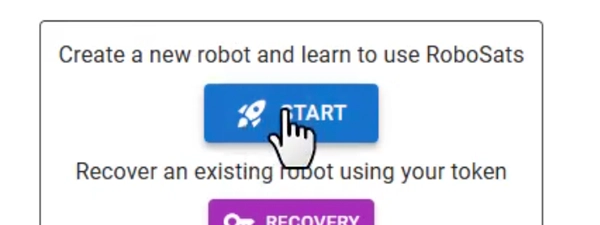
  2. Click Start to generate a robot avatar and let the coordinator hand you the secret token.
  3. Copy the token into an offline password manager or notebook before you close the welcome dialog.

Gotcha: Lose that token and support cannot reopen the contract or disputes for that robot.

2. Prep your Lightning wallet and bonds

2. Prep your Lightning wallet and bonds

Setup time: ~3 minCost: FreeRisk: Low
  1. Open a Lightning wallet that supports hold invoices and confirm you have inbound liquidity for the trade size.
  2. Decide whether you will make or take orders and review the default ~3% bond shown on the slider.
  3. Keep the wallet unlocked so the bond invoice does not expire while you negotiate fiat details.

Gotcha: Hold invoices time out fast, so stay connected until the contract room opens.

3. Settle the fiat leg and release sats

3. Settle the fiat leg and release sats

Setup time: ~10-30 minCost: Lightning routing + payment rail feesRisk: Medium
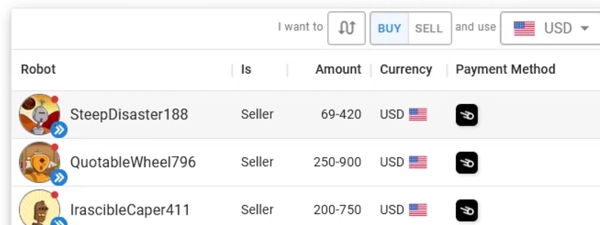
  1. Make or take an order, pay the Lightning bond invoice, and wait for the chat room to unlock.
  2. Exchange fiat instructions over the PGP-encrypted chat and send or confirm the payment through your chosen rail.
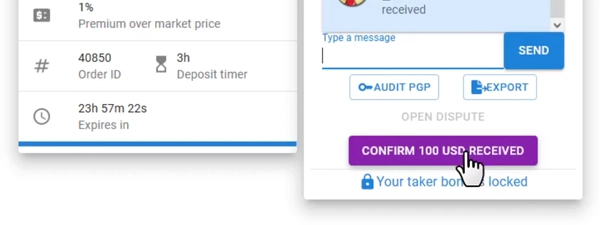
  3. Mark fiat received and release the trade so the hold invoice settles to your wallet, then sweep the sats to your long-term stack or an on-chain swap if needed.

Gotcha: If a counterparty stalls, hit Dispute before the timer ends so the coordinator can review evidence.

Fees: what you pay and when

Fees: what you pay and when

Buy bitcoin

Post an order

Maker bond: defaults to ~3% (min 20,000 sats, adjustable to 20%)

What happens:
RoboSats locks that bond in a Lightning hold invoice until the contract completes or you cancel.

Save money:
Lower the bond slider only when you trust the payment rail and keep orders short so capital is not locked for long.

Learn more

See Quick Start → Contracts for bond calculations and timers.

Receive on-chain

Take an order

Taker bond: matches the maker percentage (usually ~3%)

What happens:
You pay the hold invoice when you join the order and get it back automatically once both sides confirm fiat.

Save money:
Join orders you can settle immediately to avoid timeout penalties and re-post fees.

Learn more

Documentation explains countdown rules, refunds, and when bonds forfeit.

Pay someone

Trade fee

0.2% total (0.1% maker + 0.1% taker) charged when escrow settles

What happens:
The coordinator collects the fee from the escrowed sats as the hold invoice finalizes.

Save money:
Place maker orders with tight spreads so you earn the spread instead of paying a wider markup.

Learn more

Quick Start → Fees lists the split and how coordinator donations offset costs.

Quick answers

When do RoboSats bonds get refunded?

Bonds auto-refund when both sides confirm fiat or if you cancel before the hold invoice is charged. That timer is enforced by the coordinator, so you can exit early if a counterparty disappears.

Can I change the maker bond percentage?

Makers can slide the bond from 0% to 20% before publishing, with 3% as the default. Raising it discourages chargeback-prone rails, and you can lower it only when you trust the fiat method.

Who pays Lightning routing fees on RoboSats?

Each side pays the routing cost on the Lightning invoices they settle, which is usually just a few sats. You can keep fees negligible by using well-connected wallets or running your own node.

Key terms
Robot token
The secret string RoboSats shows when you start a session; it restores your robot avatar, bonds, and dispute access.
Hold invoice
A Lightning invoice that reserves funds without settling until both parties meet a condition, used for bonds and trade escrow.
Fidelity bond
The Lightning bond each peer posts to discourage cancellations or fraud and forfeits if they break the trade rules.
Payment methods & limits

Payment methods & limits

Bank transfer (SEPA / ACH equivalent)

Available
Fee Peer set
Speed ~1 business day
Withdraw Dispute recourse depends on your bank

Best for: Trades with documented fiat rails and a clear paper trail.

View limits & details
Min per transactionSet by maker (often ≥ 50,000 sats)
Max per transactionSet by maker; Lightning routes typically < 5,000,000 sats
Max per dayVaries by counterparties
Max per weekVaries by counterparties
Withdrawal eligibilityOnce both parties mark fiat received

Revolut / Wise

Available
Fee Peer set
Speed Minutes to hours
Withdraw Subject to app limits and reviews

Best for: Cross-border fast payments when both peers use the same fintech app.

View limits & details
Min per transactionSet by maker (often ≥ 50,000 sats)
Max per transactionSet by maker; Lightning routes typically < 5,000,000 sats
Max per dayVaries by counterparties
Max per weekVaries by counterparties
Withdrawal eligibilityOnce both parties mark fiat received

Cash in person

Available
Fee Peer set
Speed Immediate
Withdraw Bring exact change and verify bills

Best for: Local trades with trusted meetups or repeat partners.

RoboSats features & limits

RoboSats features & limits

Lightning hold-invoice escrow

Works

No platform custody Bonds keep peers honest

When you publish an order, the sats stay in a Lightning hold invoice anchored to your wallet instead of a custodian. That means nothing moves until both sides mark the fiat leg complete, and the payout lands in your balance the instant the contract clears.

Show steps

Gotcha: Keep your Lightning wallet online; hold invoices expire quickly if the coordinator has to wait.

Robot token identities

Works

One-time avatars per trade Stored client-side only

Each session mints a robot avatar from the token you save instead of an email or ID. That keeps every order tied to a disposable alias, and you can spin up a fresh robot for the next trade so past deals stay compartmentalized.

Show steps

Gotcha: Misplacing the token severs dispute access for that robot, and support cannot restore it.

Tor-first access

Works, with caveat

Onion routing by default Clearnet is fallback only

Routing the session through Tor bounces your packets through onion relays before they ever reach the coordinator. That keeps your IP and location out of the logs, with the clearnet bridge reserved as a last resort when Tor or I2P is blocked.

Show steps

Gotcha: The clearnet gateway sits behind Cloudflare; stick to Tor when privacy is the priority.

Self-custody: withdraw safely

Self-custody: withdraw safely

Pick a wallet

1. Pick a Lightning wallet with inbound liquidity

Time: ~5 minCost: FreeRisk: Low

Lightning wallets that support hold invoices keep RoboSats bonds alive while fiat clears.

Show steps
  1. Choose a wallet from the Quick Start list (Zeus, Blixt, Phoenix, Mutiny, Breez) or connect your own node.
  2. Fund it with inbound liquidity that matches your target trade size.
  3. Enable push notifications so you do not miss contract updates.
  4. Write down your recovery seed or backup key before you trade.

Gotcha: Critical: Do NOT use custodial wallets like Wallet of Satoshi. They cannot handle Hold Invoices, and you may lose your bond.

Make a safe receive code

2. Prepare a fresh Lightning invoice

Time: ~2 minCost: Routing fee (few sats)Risk: Low

RoboSats pays the trade out to the invoice you present, so you control where the sats land.

Show steps
  1. Generate a Lightning invoice in your wallet once the contract room opens.
  2. Check the expiry time and amount to confirm it matches the order.
  3. Share only the invoice string inside the encrypted chat.
  4. If you need on-chain, prepare a Boltz swap invoice before accepting the order.

Gotcha: Never reuse an invoice; the coordinator rejects duplicates to protect you from replay attacks.

Send a tiny test first

3. Run a small test trade

Time: ~15 minCost: Bonds + minimal spreadRisk: Low

Testing with a tiny order lets you confirm your wallet, Tor setup, and payment rail before scaling up.

Show steps
  1. Post or take a small trade (50,000-100,000 sats) with a rail you know well.
  2. Verify the Lightning payout arrives instantly in your wallet.
  3. Record the experience: bond timing, chat etiquette, and payout process.
  4. Decide whether the peer deserves a trust note for future trades.

Gotcha: Skipping test trades raises the chance you discover a wallet or rail issue during a larger order.

Move the rest

4. Sweep profits to long-term storage

Time: ~10 minCost: Swap or on-chain feeRisk: Low

Moving sats off your hot Lightning wallet preserves sovereignty and limits coordinator exposure.

Show steps
  1. Use your wallet’s built-in swap (or Boltz) to move sats on-chain if you want cold storage.
  2. Label the transaction with the RoboSats order ID for bookkeeping.
  3. Consolidate to a hardware wallet or multisig when balances grow.
  4. Archive the robot token with the trade receipt for future tax records.

Gotcha: Leaving large balances in a hot Lightning wallet invites device loss and liquidity drains.

Quick answers

Can RoboSats pay me on-chain instead of Lightning?

RoboSats itself is Lightning-only, but you can set up a Boltz or Deezy swap after payout to land coins on-chain.

What if my Lightning invoice expires before the seller releases sats?

Regenerate the invoice inside the room and ask the seller to repost; the coordinator keeps the bond active while you refresh it.

How do I confirm the sats arrived safely?

Check your wallet balance and verify the payment hash matches the contract details; you can also watch it settle on your node or Lightning explorer.

Privacy & Safety

Privacy & Safety

Who can see what when you use RoboSats

  • Open orders log the amount, fiat currency, price, and payment method tag alongside your robot token hash.
  • Your browser generates PGP keys for each contract so only you and the counterparty can read chat transcripts.
  • Using the clearnet gateway exposes metadata to Cloudflare, while Tor or I2P keeps IP data hidden.
Do: Stay on Tor or I2P and clear local storage after you finish each robot session.
Don't: Reuse the same robot token across multiple trades or share it in public rooms.

Lost your phone? How RoboSats recovery works

  • Click Recover robot and paste your token to reopen the order on another device.
  • If a timer expires with no dispute, bonds release automatically to the wallets that posted them.
  • Attach screenshots or bank receipts inside the encrypted chat so the coordinator can review them during disputes.
Do: Store robot tokens offline with trade notes so you can respond quickly during a dispute.
Don't: Post the token or chat logs in public support channels.

Availability & safe installs

  • RoboSats is globally accessible, but fiat rails are set by makers and vary by region.
  • Android users can bundle Orbot with the RoboSats Android app; iOS users should pair Tor Browser with a desktop or secondary device.
  • Methods like Faster Payments, Zelle, or PIX require peers in the same jurisdiction, so confirm support before you accept an order.

Quick answers

Does RoboSats log my IP address?

When you use Tor or I2P the coordinator never sees your IP; only the optional clearnet gateway collects standard web logs.

Can I delete my robot data after a trade?

Yes. Clear your browser storage or hit Delete robot, and only your local token copy remains.

What if the coordinator goes offline mid-trade?

Trades pause until the coordinator returns; keep your wallet online and watch the RoboSats Matrix status channel for updates.

Key terms
PGP chat
Each contract generates PGP key pairs so only the two peers can decrypt messages in the trade room.
Dispute timer
The countdown that defines when a bond forfeits or a dispute can be escalated to the coordinator.
Coordinator
The RoboSats server that matches orders, holds Lightning invoices, and arbitrates disputes without taking custody.
Release & Trust

Release & Trust

Open source

Full codebase published under AGPL-3.0 license for anyone to audit, fork, and self-host.

Source code
Security & compliance

Privacy guide covers Tor access, PGP chat, and operational security expectations for every trade.

Privacy guide
Terms & conditions

Non-custodial Lightning escrow is documented in the Quick Start so anyone can verify how funds stay outside the coordinator.

How it works
Profile

Profile

Founder(s)
Unknown
Unknown
Company description

RoboSats is a privacy‑first, Lightning‑native peer‑to‑peer exchange for buying and selling bitcoin with fiat. It is open‑source, requires no registration or KYC, and runs primarily over Tor (with I2P ...

RoboSats is a privacy‑first, Lightning‑native peer‑to‑peer exchange for buying and selling bitcoin with fiat. It is open‑source, requires no registration or KYC, and runs primarily over Tor (with I2P and an Android app available). Each trade uses a one‑time “robot” identity tied to a secret token you control, and all peer chat is end‑to‑end encrypted with PGP. The flow is simple: make or take an order, both sides lock small Lightning bonds, the seller locks a Lightning hold‑invoice escrow, fiat moves, then sats are released.

Founded in
2022
Website

FAQs

How do RoboSats Lightning bonds and escrow work?

Each contract starts with the maker posting a Lightning hold-invoice bond—defaults to ~3% of the trade—and the taker matching it when they join, while the seller locks the sats in a hold invoice escrow. That lock keeps funds frozen until both parties confirm fiat, which means you can complete the trade and reclaim everything or cancel during the timer if the peer stalls.

What fees does RoboSats charge on trades?

RoboSats collects 0.2% per completed trade, split 0.1% to the maker and 0.1% to the taker when the hold invoice settles. That sits on top of whatever spread you negotiate, so you can tighten your offers to keep the total cost in sats low.

Does RoboSats require KYC or accounts?

Instead of accounts, RoboSats generates a one-time robot avatar from a secret token you control and stores only that token locally. That keeps your personal data off the coordinator, and you can rotate a fresh robot for every trade to keep orders unlinkable.

Which Lightning wallets work best with RoboSats?

You need a Lightning wallet that can issue invoices and hold payments for a few minutes; RoboSats docs highlight Zeus, Blixt, Phoenix, Breez, Mutiny, and BlueWallet (LDK) because they keep the bond open until fiat clears. That support prevents premature expiry, and you can keep a second wallet with inbound liquidity ready if your main one is routing a large trade.

How are disputes handled if a counterparty does not release sats?

If fiat fails, you hit Dispute in the chat, upload the payment proof, and the coordinator reviews both bond invoices plus your evidence. Their ruling routes the trade hold invoice either to you or the counterparty, so you can recover funds when you documented the fiat leg.

×

Rate this service

Alternatives to RoboSats