Bisq Review: Fees, Features & Setup Guide

Updated: November 2025

Quick verdict

positive icon Best for: People who want to buy or sell bitcoin peer-to-peer with refundable deposits instead of trusting an exchange.

neutral icon Consider if: You are ready to run desktop software. (Note: Bisq Easy now allows buying without a security deposit).

negative icon Not ideal when: You need instant liquidity, mobile access, or trades without any on-chain confirmations.
Getting started

Getting started with Bisq

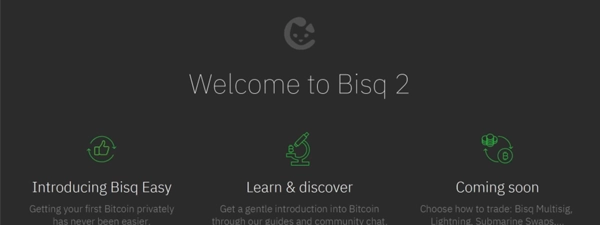
1. Install Bisq and connect over Tor

1. Install Bisq and connect over Tor

Setup time: ~10 minCost: FreeRisk: Low
  1. Download Bisq from the official downloads page and verify the installer signature.
  2. Install the app, let it connect to Tor, and create a password for your Bisq wallet.
  3. Write down your seed words and store them offline before you start trading.

Gotcha: Bisq cannot recover your seed phrase or password if you lose them.

2. Fund your Bisq wallet for deposits

2. Fund your Bisq wallet for deposits

Setup time: ~20 minCost: Network feeRisk: Medium
  1. Open Funds > Receive funds and copy your Bisq bitcoin address.
  2. Send a small amount of bitcoin from a wallet you control so you can cover security deposits and fees.
  3. Wait for at least one confirmation; Bisq shows the balance once the transaction confirms.

Gotcha: Keep a buffer of sats in Bisq so new offers do not fail for lack of collateral.

3. Take your first trade

3. Take your first trade

Setup time: ~30-90 minCost: Fees + depositRisk: Medium
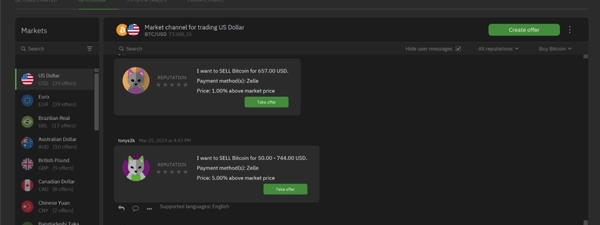
  1. Browse the offer book, filter by your payment method, and pick an offer with limits that fit.
  2. Review the security deposit, fees, and payment window on the confirmation screen before you accept.
  3. Follow Bisq's prompts to send the fiat payment, mark it as sent, and wait for the seller to release the escrow.

Gotcha: Stay online during the trade so you can respond quickly if a mediator contacts you.

Quick answers

How much bitcoin should I keep in Bisq for deposits?

Most fiat trades need roughly 0.01 BTC to cover the buyer deposit and fees, and Bisq shows the exact requirement before you accept the offer.

Do I need to leave Bisq running during a trade?

Yes. Bisq relays chat messages and payout transactions over Tor, so staying online avoids mediation delays.

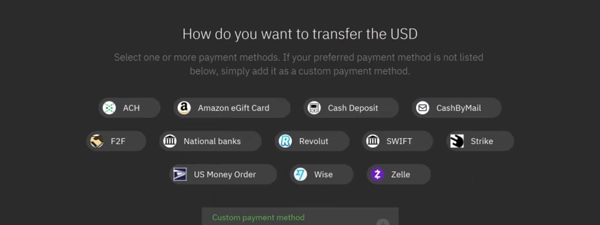
What if my payment method is not listed?

You can create a new offer with your preferred method or revisit the market later; payment method availability depends on which peers are online.

Fees: what you pay and when

Fees: what you pay and when

Deposit cash

Fund your Bisq wallet

On-chain mining fee you choose

What happens:
You send bitcoin from an external wallet to Bisq so you can pay trading fees and security deposits.

Save money:
Fund when mempool fees are low or use a wallet that supports replace-by-fee if you need to bump the transaction.

Learn more

Bisq recommends keeping a small buffer of sats ready for new trades.

Buy bitcoin

Take an offer

BTC fees: Maker 0.15% / Taker 1.15%
BSQ fees: Maker 0.075% / Taker 0.575%

What happens:
Bisq charges maker and taker trading fees plus locks the refundable security deposit when you accept an offer.

Save money:
Hold BSQ to pay the discounted rate or post maker offers so you pay the lower side.

Learn more

The Bisq DAO votes on fee parameters and the client updates the schedule automatically.

Pay someone

Post the security deposit

Refundable collateral: typically 15%-50% of trade size

What happens:
Bisq locks both parties' deposits in the 2-of-2 escrow to incentivize delivery of the fiat payment.

Save money:
Complete account signing so Bisq can raise your limits with smaller collateral requirements.

Learn more

Deposit ratios vary by payment method and appear on each offer screen.

Withdraw bitcoin

Withdraw to your wallet

On-chain mining fee estimated by Bisq

What happens:
After a trade settles you can send your bitcoin to another wallet and pay the network fee once.

Save money:
Batch withdrawals or lower the fee slider if you can wait for slower confirmation.

Learn more

Bisq lets you edit the withdrawal fee before broadcasting the transaction.

Quick answers

Who pays the mining fees in a Bisq trade?

Makers pay the maker fee transaction while takers cover the deposit, payout, and taker fee transactions. Bisq lists each mining estimate before you confirm.

Do I ever lose my security deposit?

Deposits return to you when the trade completes, but mediation or arbitration can distribute them if one side misses the deadline or breaks the rules.

What happens if BSQ's price moves after I accept an offer?

The fee amount is locked in when you confirm the trade, so BSQ price changes afterward do not affect that order. You can convert more BSQ later if you plan to keep using the discount.

Key terms
Security deposit
Refundable bitcoin collateral each side locks in Bisq's multisig escrow to keep trades honest.
Account signing
A reputation process where you complete smaller trades or provide signed bank details so Bisq can raise your limits and reduce required deposits.
BSQ
A colored bitcoin token that funds the Bisq DAO and lets you pay trading fees at a discounted rate.
Payment methods & limits

Payment methods & limits

SEPA Bank Transfer

Available
Speed ~2-6 days
Withdraw Release after seller confirms payment

Best for: Euro buyers who can wait for bank settlement in exchange for higher limits.

View limits & details
Min per transaction€10 equivalent
Max per transaction0.25 BTC to start (higher with account signing)
Max per dayDepends on Bisq account age
Max per weekDepends on Bisq account age
Withdrawal eligibilityPayout releases once the seller marks the transfer received.

Zelle

Available
Fee Free
Speed ~minutes to same day
Withdraw Release after seller verifies payment

Best for: U.S. buyers who want fast bank transfers up to the starter limit.

View limits & details
Min per transaction$10 equivalent
Max per transaction0.25 BTC until your account ages in
Max per daySubject to your bank's Zelle caps
Max per weekSubject to your bank's Zelle caps
Withdrawal eligibilitySeller must confirm funds within the four day trade window.

Cash in person

Available
Speed ~same day meetup
Withdraw Release once cash changes hands

Best for: Local trades where you can meet safely and prefer no banking trail.

View limits & details
Min per transactionSet by the offer maker
Max per transactionUp to 0.5 BTC on signed accounts
Max per dayDepends on trusted counterparties
Max per weekDepends on trusted counterparties
Withdrawal eligibilityConfirm the cash in person before you co-sign the payout.
Compatibility: Where Bisq runs

Compatibility: Where Bisq runs

Bisq is a heavy client that runs a local Bitcoin node and Tor hidden service. It requires a desktop computer.

Desktop OS

  • Windows 10+
  • macOS Apple Silicon/Intel
  • Linux Debian/RPM

Mobile App

Verified
  • Bisq Mobile
    Notifications only (cannot trade)
Self-custody: finish the trade safely

Self-custody: finish the trade safely

Pick a wallet

1. Pick a cold storage wallet

Time: ~10 minCost: $0-$200Risk: Low

Bisq delivers bitcoin to you after the trade, so line up a wallet you control before taking larger offers.

Show steps
  1. Choose a hardware wallet or another cold storage option from our wallet guide.
  2. Initialize it, write down the seed words, and test the device before you fund it.
  3. Store backups in separate safe locations away from your computer.

Gotcha: Do not keep the only copy of your seed on the same computer that runs Bisq.

Make a safe receive code

2. Create a fresh receive address

Time: ~2 minCost: FreeRisk: Low

Generating a new address for every Bisq withdrawal keeps your trade history private.

Show steps
  1. Open your self-custody wallet and generate a new bitcoin address.
  2. Double-check the address on the hardware screen or software UI.
  3. Copy and paste it into Bisq only when you are ready to withdraw.

Gotcha: Never reuse a withdrawal address; it links multiple trades together.

Send a tiny test first

3. Move a small test amount

Time: ~10-30 minCost: Network feeRisk: Low

Testing with a small withdrawal lets you confirm your wallet setup before you move the full trade amount.

Show steps
  1. Withdraw a small amount from Bisq using the Standard fee level.
  2. Watch the transaction confirm in both Bisq and your destination wallet.
  3. Verify the amount on your hardware wallet screen or block explorer.

Gotcha: Wait for the transaction to confirm before deleting Bisq's local data or shutting down your machine.

Move the rest

4. Withdraw the remaining balance

Time: ~10-60 minCost: Network feeRisk: Low

Finishing the withdrawal moves all escrowed bitcoin to the wallet you control, closing the loop on your trade.

Show steps
  1. Select Withdraw funds in Bisq and paste a fresh address from your cold storage wallet.
  2. Choose a fee level that matches how fast you need confirmation.
  3. Label the transaction in your wallet so you remember which trade it came from.

Gotcha: If you withdraw with the minimum fee during heavy mempool backlog, plan for a longer confirmation time.

Quick answers

Can I send Bisq payouts straight to my hardware wallet?

Yes. Paste a fresh address from your hardware wallet when you withdraw, and confirm the address on the device screen before you broadcast.

How do I verify the escrow payout?

Open the trade details to copy the transaction ID or view it inside Bisq, then check it in a block explorer such as mempool.space.

What if I need to export my Bisq wallet?

Use Account > Backup to save an encrypted backup alongside your seed words before you move the funds.

Privacy & Safety

Privacy & Safety

Who can see what when you use Bisq

  • Bisq keeps your fiat account details on your device until you take a trade.
  • Trade chat logs and dispute messages travel through Tor and are only visible to the parties involved.
  • On-chain escrow transactions are public, so use fresh addresses to avoid linking trades.
Do: Use a dedicated operating system account for Bisq and encrypt your computer disk.
Don't: Share screenshots of your payment accounts outside Bisq's dispute chat.

Lost your phone? How Bisq recovery works

  • Restore on a new machine by installing Bisq, importing your encrypted backup, and entering your wallet seed.
  • Leave the app open so it can resync the DAO state and your trade history over Tor.
Do: Test your backup by restoring it on a spare machine when convenient.
Don't: Delete the old data directory before you confirm that the new install works.

Availability & safe installs

  • Bisq runs worldwide, but each payment method has eligibility rules tied to local banking regulations.
  • Follow your country's banking compliance obligations when you send or receive fiat.
  • For crypto-to-crypto trades, you can stick to shorter settlement windows and avoid banking hours.

Quick answers

Does Bisq see my payment data?

No. The data lives on your machine and is only shared with the counterparty you trade with.

Can I use Bisq without Tor?

No. Tor is mandatory and baked into the client, which is how Bisq keeps the network private and censorship resistant.

What should I do if a counterparty asks for extra ID?

Refer them to the Bisq trade rules and involve a mediator instead of sharing documents outside the app.

Key terms
DAO state
The governance data Bisq downloads over Tor so it can enforce DAO parameters like fees and security deposits.
Mediator
A Bisq contributor who helps resolve fiat trade disputes before they escalate to arbitration.
Release & Trust

Release & Trust

Open source

Open-source desktop client and DAO code on GitHub

GitHub repository
Security & compliance

Security deposits, dispute process, and trade rules

Security docs
Privacy policy

Privacy policy and data handling details

Privacy policy
Terms & conditions

Terms of use for Bisq contributors and traders

Terms of use
Profile

Profile

Founder(s)
Manfred Karrer
Manfred Karrer
Company description

Bisq is a decentralized, open‑source desktop app created by Manfred Karrer for buying and selling bitcoin directly with other people. It routes all traffic over Tor, uses a built‑in non‑custodial wall...

Bisq is a decentralized, open‑source desktop app created by Manfred Karrer for buying and selling bitcoin directly with other people. It routes all traffic over Tor, uses a built‑in non‑custodial wallet and has no sign‑ups or KYC. Trades span many national currencies and payment rails, and the project is funded and governed through a community DAO with the BSQ token rather than a company.

Founded in
2014
Website

FAQs

How do Bisq trading fees and BSQ discounts work?

Bisq sets maker fees at 0.15% and taker fees at 1.15% when you pay in BTC, and the DAO halves each rate to 0.075% and 0.575% if you spend BSQ. You can choose the fee currency before confirming a trade and see the exact total on the review screen.

What security deposit do Bisq trades require?

Every trade locks both parties' refundable security deposits in a 2-of-2 multisig escrow alongside the trade amount. Deposit sizes vary by payment method and account signing stage, and Bisq shows the required amount before you accept an offer.

Which payment methods can I use on Bisq worldwide?

Bisq supports rails such as SEPA, Zelle, Wise, Revolut, and cash trades, each with its own settlement window and trade limit. You can filter the offer book by payment method to find rails that match your country.

Does Bisq require identity verification or accounts?

Bisq runs over Tor with no central accounts or KYC, so your payment profiles and trade history stay on your computer. You share the needed details only with your counterparty during the trade.

How long do Bisq trades take to settle?

A Bisq trade waits for the escrow transaction to confirm on-chain, then gives you a payment window that ranges from minutes on crypto rails to four to six days on fiat rails. Once both sides mark payment sent and received, the escrow releases and your deposit returns automatically.

×

Rate this service

Alternatives to Bisq